

Home » Archive by category 'Sales Management'

Holiday Season Reporting: Using Call Data to Prepare for Your Busiest Months

The holiday season has always been one of the most intense times of the year for global businesses. Between unpredictable call spikes, shifting team schedules, and higher sales activity, the weeks from November through January can put real pressure on your customer experience. But with the right data and the right reporting framework, you can turn the holiday rush into a period of efficiency, insight, and improved customer satisfaction.

Holiday season reporting helps businesses understand how customer behavior changes during the holidays, which regions need additional support, when call volumes spike, and how well your teams keep up with demand.

With Global Call Forwarding, you can use call analytics, AI Call Insights, phone number tagging, and custom reports to build a clear, structured view of your busiest months and make proactive adjustments that ensure a smooth holiday experience for your customers and your teams.

Below, we break down how to build a holiday reporting strategy and what to measure, so you head into the season with confidence:

Why Holiday Season Reporting Matters

During the holidays, customers shop more, travel more, and require more support. That change in behavior often translates into:

  • Higher inbound call volume
  • Longer call duration
  • More escalations and time-sensitive requests
  • Greater regional variation in call patterns
  • Increased demand for after-hours and weekend coverage

These aren’t normal fluctuations; they’re seasonal trends that businesses can predict when they’re supported by good reporting.

A holiday dashboard turns reactive support into proactive planning, giving your business greater resilience, agility, and customer satisfaction during its most demanding season.

By closely tracking key call data points throughout the season, managers can:

  • Shift staffing quickly during high-traffic periods
  • Reassign routing or activate backup flows when a team is overloaded
  • Update IVR menus based on common issues found in transcripts and summaries
  • Support regional teams more effectively during timezone-specific spikes
  • Identify and resolve friction points before they turn into customer dissatisfaction
  • Track campaign performance and adapt promotions in real time

What Visibility Do You Get with Holiday Call Reports?

When set up correctly and with the right tools, holiday call reporting gives you visibility into:

  • When your call traffic is highest
  • Which regions generate the most support requests
  • How sentiment shifts during peak periods
  • What caused missed calls last year
  • How well your agents, routing plans, and IVR performed
  • Which holiday campaigns generated real call-driven revenue

By combining AI Call Insights, advanced call analytics, and number tagging, you can understand not only how many calls you received, but why customers were reaching out, what they needed, and how effectively your team responded.

What to Include in a Holiday Reporting Framework

Below we highlight the core call metrics and data that businesses can use to prepare for the holidays and the seasonal demands that come with it. This data can help support, sales, and operations teams make informed decisions before and during the holiday rush.

Look out for our How to resources throughout this guide to see how to set this up with Global Call Forwarding.

1. Call Volume Overview (Nov–Jan)

Your holiday reporting should begin with a top-level view of call activity during the busiest months. This establishes a baseline for understanding demand and helps you determine whether your system and staffing kept up or if adjustments are required this year.

Reviewing multiple seasons in a row also reveals patterns: which days consistently spike, which promotions drive traffic, and which weeks require extended coverage.

Start with a macro view. Identify:

  • Total inbound calls
  • Answered vs missed calls
  • Abandoned call trends
  • Volume changes vs last year’s holiday season

If your missed calls rate climbed during past peak days, you may need overflow routing, additional agents, or time-based routing. If your total volume shifted earlier or later than expected, adjust your staffing and campaign timing for this year.
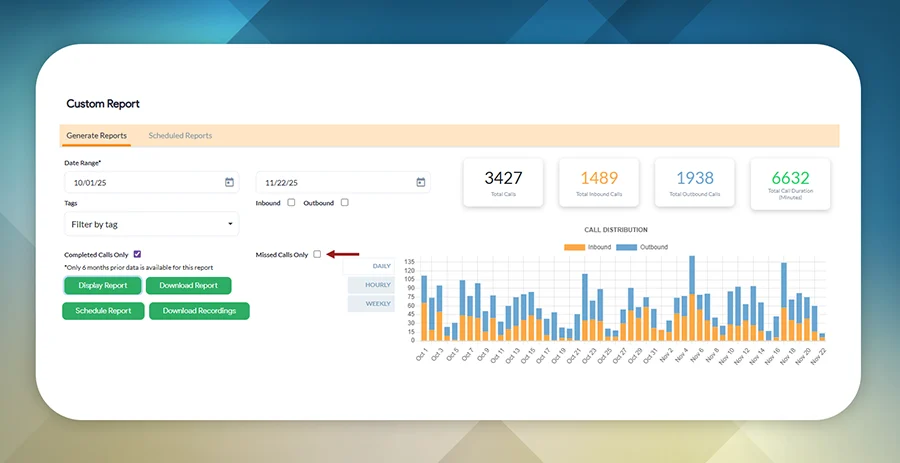
Screenshot showing call volume for a specific date range.

GCF features that help:
Custom reporting, scheduled reports, time-based routing, redundant routing

2. Regional Breakdown

Holiday behavior varies dramatically by market. Retail and travel-heavy regions may experience surges weeks before others, while some time zones show concentrated demand after business hours. A regional breakdown lets you understand not just how much traffic you received, but where and when customers needed you.

Analyze holiday traffic by region or local phone numbers:

  • APAC early-morning spikes
  • EMEA midday bursts
  • Americas evening surges

Adding phone number tags for regional lines makes it easy to pinpoint which markets drove demand and when.
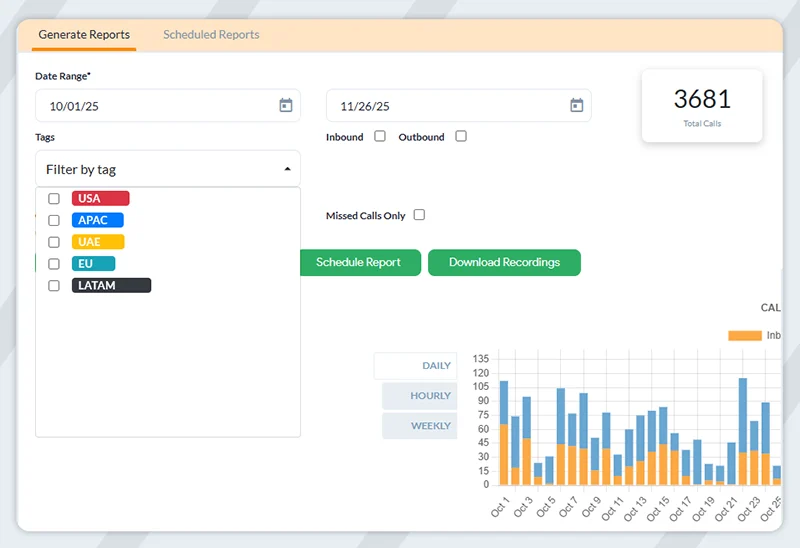
Screenshot of a custom call activity report for specific phone number tags and regions.

If APAC saw unexpected overnight spikes last year, consider adding local ring groups or routing after-hours calls to agents in compatible time zones. Strong regional data also helps validate whether you need additional local numbers or expanded Local 2-Way Voice coverage in high-demand markets.

GCF features that help:
Phone number tags, Local 2-Way Voice, Regional Analytics, advanced routing

3. Customer Experience & Sentiment

The holidays are emotionally charged; customer expectations are higher, patience is lower, and issues are often urgent. Understanding the quality of interactions (not just the quantity) is essential for maintaining customer trust. Track:

  • Call duration
  • Call abandonment rates
  • Sentiment scores
  • Repeated customer issues
  • Common keywords that come up in conversations

AI Call Insights can reveal common holiday frustrations, shipping-related inquiries, billing issues, or seasonal demand patterns.
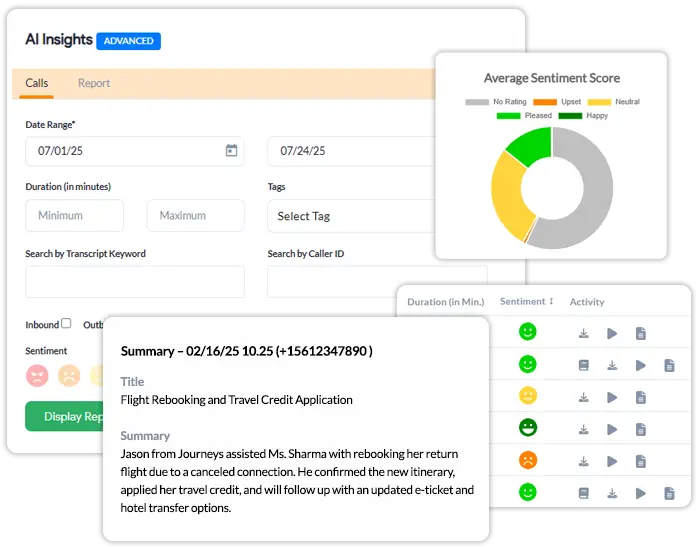
Screenshot of AI Call Insights from the Global Call Forwarding dashboard.

If sentiment dips or call duration spikes, you may need updated scripts, better holiday FAQs, or an improved IVR to direct callers more efficiently. Identifying repeated seasonal questions helps you prepare documentation, seasonal landing pages, and proactive messaging for this year.

GCF features that help:
AI Call Insights, call transcription, Custom Reports, keyword search

4. Routing & IVR Performance During Seasonal Peaks

Routing performance plays a major role in how well your business handles holiday traffic. While your analytics may not always show the exact routing path, final failover destination, or which backup flow was triggered, you can still use available data to understand how effectively callers reached the right teams and where your routing strategy may need adjustments.

Your holiday reporting should look at indirect indicators of routing performance, such as:

  • Surges in missed or abandoned calls during certain hours
  • Spikes in voicemail traffic that may signal under-resourced teams
  • Higher-than-usual call duration, indicating customers aren’t reaching the right department quickly
  • Sentiment drops correlated with long queues or slower connection times
  • Increased after-hours or weekend calls despite published holiday hours
  • IVR selections and menu usage that show where callers tried to navigate

If voicemail traffic or missed calls increase during peak windows, it may signal a routing mismatch or insufficient coverage. If callers frequently choose the same IVR option, consider simplifying your menus or directing that option to a more robust ring group during the holidays.

Use year-over-year trends to decide whether to activate backup routes earlier, extend support hours, or adjust regional routing behavior. Review this early so you can rebuild your holiday call flows before traffic rises.

GCF features that help:
Holiday routing, time-based routing, backup call flows, IVR management
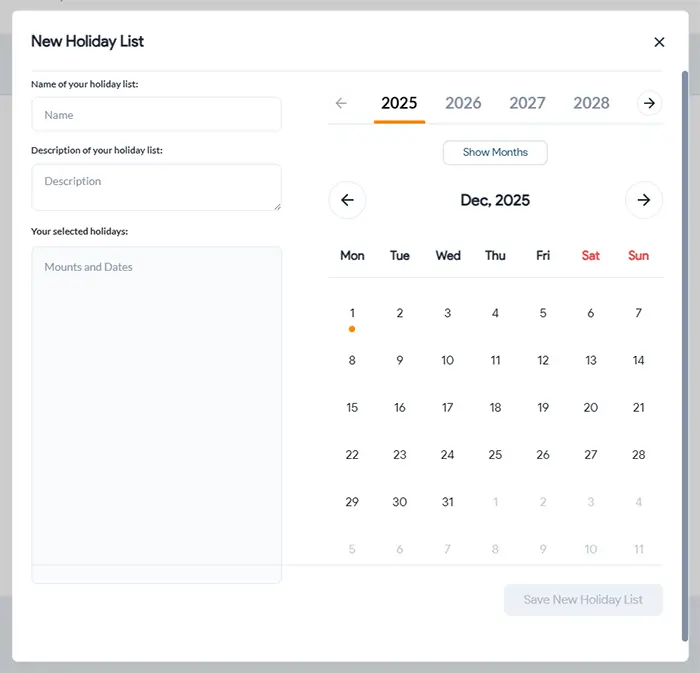
Screenshot of custom Holiday Call Routing from the Global Call Forwarding dashboard.

5. Seasonal Sales Performance & Campaign Attribution

Holiday calls aren’t just service-focused; they’re revenue drivers. Tracking which campaigns, regions, or phone lines influenced conversions helps you understand how holiday demand impacts your sales funnel and which marketing efforts are worth repeating.

Many holiday campaigns include special numbers, promo lines, or inbound sales routes. You can track calls and measure:

  • Leads generated from campaign-specific toll-free or local lines
  • Conversion trends by region or caller location
  • Calls tied to CRM opportunities
  • Performance of phone-enabled landing pages
  • Which promos drove the most inbound calls

If a specific campaign number drove a disproportionate share of qualified leads, assign similar numbers or repeat the offer this year. If certain regions converted at higher rates, adjust your ad spend or extend local support hours for better coverage.

GCF features that help:
Phone number tags, CRM integrations, outbound caller ID, softphone, CRM integrations, campaign call tracking

6. Staffing & Team Preparedness

Holiday reporting also highlights operational health. When call volume surges, the ability of your team to keep up can determine whether customers feel supported or overlooked.

Now some staffing metrics like hours understaffed are tracked internally within workforce systems. With our call data, you can unveil clear indicators of where your support or sales teams may have been stretched thin. Focus on behavioral patterns in your call logs that reflect staffing pressure, such as

  • Call spikes clustered around specific hours – Suggesting times when more agents may be needed.
  • Impact of missed calls or higher unanswered call counts during certain shifts – Often an early sign of undercoverage or competing priorities for the team.
  • Longer call durations during peak days – Meaning agents may have been resolving more complex holiday-related issues.
  • Sentiment drops in transcripts and summaries – Indicating moments when customer frustration increased, possibly due to slower response times.
  • Voicemail or after-hours call volume increasing unexpectedly – Signaling misalignment between staffing and customer demand.
  • Patterns in agent performance if you use individual or department-specific numbers – Phone number tags and assigned lines help show which teams carried heavier seasonal load.

If missed or abandoned calls spike at certain hours, adjust your routing or staffing during those windows. If sentiment trends negatively during specific days or campaigns, consider additional seasonal training or updated scripts. If after-hours calls are higher than expected, revisit your holiday hours or set more granular time-based routing.

By comparing performance across previous seasons, you can see whether you need:

GCF features that help:
Call summaries, sentiment analysis, scheduled call reports, number tagging, time-based routing, call outcome analysis

7. Recommendations for Next Season

Your holiday report is only valuable if it leads to action. The insights you collect should guide planning for the upcoming season, helping you build a more resilient and customer-friendly experience.

Your insights should help you determine:

  • Which regions need expanded coverage
  • How to optimize routing for predictable holiday peaks
  • Where IVR menus should be streamlined
  • Whether customer sentiment indicates friction points
  • What staffing adjustments would improve outcomes
  • Which promotions or campaigns should be repeated or retired

Create a “Holiday Readiness Checklist” based on your findings and begin updating routing, FAQs, IVR scripts, and staffing plans at least 4-6 weeks before peak demand begins. Refine your dashboards so next year’s reporting becomes even more precise.

Building Your Holiday Dashboard with GCF

Creating a holiday-specific reporting dashboard is one of the most effective ways to monitor real-time performance during your busiest season. While the holidays often bring unexpected spikes in customer demand, a well-structured report helps your support and sales leaders stay ahead by visualizing call trends, spotting early signs of friction, and making fast adjustments to routing or staffing.

With Global Call Forwarding, you can build practical, data-driven call reports that reflect how your business performs during peak holiday windows. You can then use this data as is or feed it into your own reporting system like Excel, Looker Studio, Power BI, etc.

Your holiday voice dashboard should include the following components:

  • Inbound and outbound call volume
  • Completed vs missed calls
  • Regional visibility using local phone numbers and phone tags
  • Hourly and daily peak charts
  • Sentiment monitoring
  • Voicemail and after-hours call trends
  • Campaign phone line performance
  • Call outcome trends (transferred, answered, voicemail, missed)

By keeping these data points visible, support and sales managers can shift staffing, adjust routing, and respond quickly when customer activity spikes.

Let Your Data Do the Heavy Lifting This Season

Holiday reporting transforms seasonal chaos into clarity. When you understand how customers behave, where call volume surges, and what your teams need to succeed, you can deliver a smoother, faster, more reliable experience—no matter how busy the season becomes.

With Global Call Forwarding’s advanced routing, AI Insights, analytics, and flexible phone system features, your business can stay ahead of demand, protect customer satisfaction, and create a holiday season that is productive—not overwhelming.

If you’d like help building your holiday dashboard or reviewing last year’s data, our team is here to assist.

Call us at +1 (561) 908-6171 or start a live chat to get holiday-ready today.

How to Choose the Best Phone Integration for Zoho CRM

You rely on calls as a salesperson to communicate with potential clients. But without proper tracking, digilent follow-ups and successful outcomes can be tedious. Disorganized call logs might result in inefficiencies and missed sales opportunities.

That’s where Zoho CRM phone integration comes in. With the right softphone integration, your team can place and receive calls directly within Zoho CRM while automatically logging interactions. This improves tracking, collaboration, and efficiency across your sales and support operations.

In this article, we will go over:

What is a Phone Integration for Zoho CRM?

A phone integration for Zoho CRM connects your telephony system with your CRM so your teams can manage calls and customer data from a single interface.

Sales and support teams can place calls using click-to-call, receive inbound calls via softphone, and automatically log call records with notes and outcomes.

This phone integration could be an integration with call center software or a VoIP telephony provider offering a softphone integration.

This centralized communication helps teams deliver faster, more informed service while eliminating manual logging and system switching.

For example, a Global Call Forwarding and Zoho integration would bring advanced global telephony and functionality to the CRM’s platform.

Why Do Businesses Need a High-Quality Zoho CRM Phone Integration?

Integrating your phone system with Zoho CRM helps unify communication and streamline operations across sales and support teams. A high-quality integration ensures every call is tracked, contextualized, and actionable — turning conversations into insights and opportunities.

Here’s why the right Zoho CRM phone integration can make all the difference for growing businesses:

  • Global Reach
    Pair the VoIP integration with international numbers to support customers in different countries while maintaining a local presence.
  • Unified Communications
    Integrating your phone system with Zoho CRM and enabling features like click-to-call allows your team to make calls from the CRM interface. This results in more effective communication, reduced manual dialing errors, and saved time. ​Eliminate toggling between apps and reduce context-switching.
  • Customer Context
    The best phone integration for Zoho allows agents to access interaction history, call recordings, and notes in real time — helping them tailor every conversation, improve customer satisfaction, and foster long-lasting business relationships. ​
  • Scalability
    Integrations with virtual phone number providers can scale with your team as your call volume grows or you expand to new markets.
  • Advanced Call Features
    Depending on your provider, you can even access additional features like voicemail, transcription, and call recording. These features support training and quality assurance initiatives by offering insightful information about client interactions.

Through Zoho phone integrations, Zoho CRM becomes the central communication hub for every customer interaction, ensuring that each conversation promotes a more purposeful and knowledgeable sales process.

How Do Zoho Phone Integrations Work?

Zoho phone integrations work by connecting your cloud telephony provider with your Zoho CRM account through an API or native app, allowing real-time voice communication and activity tracking directly within the CRM.

Here’s how a typical integration functions:

Softphone or Dialer Access: After installing the integration, users see a softphone or dialer within the Zoho CRM interface — usually at the bottom corner. This gives users the ability to make or receive calls without leaving their workflow.

Click-to-Call from Zoho Pages: When viewing a lead or contact, users can click the phone number to initiate a call. This reduces manual entry and improves dialing accuracy.

Inbound & Outbound Call Handling: Incoming calls will trigger a screen pop that shows the caller’s contact record in Zoho (if one exists), allowing the agent to respond with full context.

Automatic Logging & Call Notes: After each call, the integration logs call details like duration, outcome, and time under the contact’s record. Some integrations also allow you to tag the call, leave a note, or categorize it for reporting.

Call Recordings & Transcriptions: If your provider offers it, call recordings and transcriptions can be automatically attached to each contact or deal, making it easier to revisit conversations later.

Reports & Dashboards: You can use Zoho’s reporting tools to track call volume, agent activity, and outcomes — helping managers monitor performance and improve customer engagement.

With Global Call Forwarding, setting up the Zoho integration is straightforward. Once you activate the Zoho softphone integration from your GCF control panel and install the extension from Zoho Marketplace, your team can start making and receiving calls instantly — all while keeping CRM data clean, accurate, and up to date.

Adding international phone number coverage to Zoho CRM

Common Use Cases for Telephony in Zoho CRM

Integrating your phone system with Zoho CRM enables more than just call functionality. It empowers your team to manage the full customer journey through one platform while also supporting cross-team collaboration. Here are a few common ways businesses use telephony within Zoho to streamline communication and drive efficiency.

Inbound Support: Route incoming calls to the right agents and log them in the CRM for better customer context.

Outbound Sales: Use click-to-call for faster prospecting and track outcomes to optimize follow-ups.

Customer Onboarding: Schedule and manage onboarding calls with customer information and interaction history easily available.

Remote Call Handling: Let global and distributed teams handle calls with local numbers and CRM-integrated softphones.

What to Look for in a Zoho Phone Integration?

TL;DR:
The best Zoho phone integrations combine powerful in-CRM features (like click-to-call, softphone access, and call logging) with a flexible, globally connected voice provider. Look for integrations that enhance your team’s productivity, simplify call management, and scale as your business grows — all while keeping your CRM as the central hub for communication.

Choosing the right Zoho phone integration involves more than just connecting a dialer. You’ll want to evaluate both the softphone’s in-CRM functionality and the telephony provider’s network reach, reliability, and voice features.

Let’s dive into these key factors to consider when selecting the best Zoho phone integration:

1. Business Phone Number Coverage

A strong integration starts with a provider that offers the right number coverage for your business needs. Whether you’re looking to establish a local presence in key markets or consolidate support operations globally, your provider should offer local, mobile, or toll-free numbers in your target regions.

With Global Call Forwarding, you can purchase or port phone numbers from 160+ countries and instantly connect them to your Zoho CRM system — enabling inbound call handling and smarter call routing worldwide.

2. Call Management Features

Effective inbound and outbound call handling is essential for productive sales and support teams. With a high-quality Zoho CRM phone integration, your team can access key call management tools directly within the CRM, including:

  • Click-to-call functionality to initiate calls instantly from any contact or lead record, reducing manual errors and saving time.
  • Softphone access is crucial. Choose a provider that offers a softphone integrated directly into Zoho CRM. This lets users handle calls without leaving the CRM interface — improving focus and user experience.
  • Automatic call logging to ensure all inbound and outbound calls are recorded with accurate timestamps, durations, and outcomes — eliminating the need for manual data entry.
  • Call recording and transcription to support quality assurance, compliance, and training. Managers can review conversations and leverage transcriptions to coach teams or track trends across customer interactions.

These features help your team stay organized, manage high-volume sales and support calls, improve productivity, and deliver consistent, high-quality communication.

With Global Call Forwarding’s Zoho softphone integration, you can enjoy these features:

  • Softphone access within Zoho pages
  • Native click-to-call functionality, embedded right into the CRM interface
  • Automatic data synchronization
  • Call logging
  • Voicemail
  • Call recording
  • Call transcription and translation

You can manage and access these features within Zoho CRM pages as well as our control panel.

3. Advanced Call Analytics

The right integration should deliver more than just basic call logs — it should provide deep, actionable insights. Look for tools that track call volume over time or region, call outcomes, responsiveness, etc. Advanced solutions also let you tag phone lines by purpose (sales, support, billing, etc.) and analyze volume across different regions, departments, or customer segments.

Global Call Forwarding offers detailed analytics through its control panel, allowing teams to filter and monitor performance with ease. With AI-powered features, businesses can even analyze sentiment, detect trends, search for keywords, and pinpoint improvement areas — helping teams make smarter decisions, faster.

4. Integration with Existing PBX Systems

Your Zoho phone integration should complement your existing PBX or VoIP setup, not complicate it. Compatibility with your current phone infrastructure ensures a smooth transition and reduces implementation costs.

If you’ve already invested in a business phone system, look for solutions that support SIP forwarding or BYOC to extend global reach while maintaining your current infrastructure. Global Call Forwarding’s flexible architecture makes this easy; chat with our experts to learn more about our solutions.

5. Scalability and Flexibility

As your business grows, your phone integration should grow with it. Choose a provider and integration that can scale with new users, regions, and communication channels. Global Call Forwarding supports every type of business environment from small support teams to large, multi-site sales operations — with 24/7 support and customizable call handling rules to match your evolving needs.

How Global Call Forwarding Integrates with Zoho CRM

Experience a more innovative way to manage calls and drive business growth with our Zoho CRM integration. With our dedicated softphone integration, users can:

  • Make and receive calls from GCF softphone within Zoho CRM
  • Access global connectivity with local & toll-free numbers from 160+ countries
  • Manage inbound calls with advanced routing
  • Improve response rates with outbound calling, Local 2-Way Voice, and local caller IDs
  • Enjoy 20+ advanced call management features
  • Centralize business communication apps
  • Enable sales and support teams to work more efficiently
  • Benefit from reliable 24/7 support to address issues

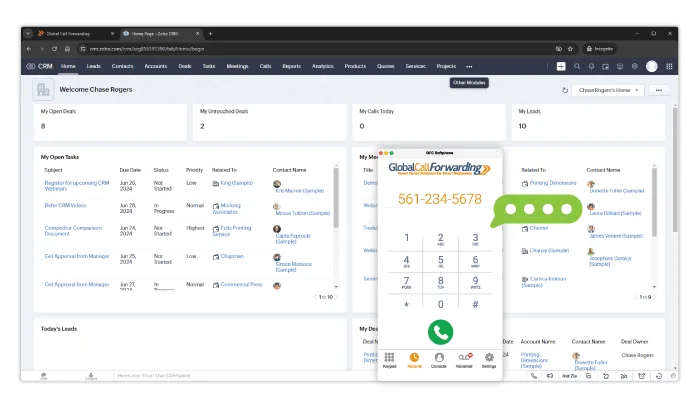
Screenshot of GCF VoIP Softphone within Zoho CRM

Our integration is easy to set up. Simply activate the Zoho integration from your GCF control panel and install our softphone extension from the Zoho Marketplace. You’ll be up and running in minutes.

We also support integrations with helpdesk and ticketing systems like Zendesk, Intercom, and Zoho Desk — making us a strong fit for customer support teams who need voice capabilities across multiple systems.

Integrate Telephony into Your CRM with GCF

Choosing the right phone integration for Zoho CRM depends on your team’s needs, call volume, and global presence. The best solution will centralize your voice and CRM workflows, support growth, and improve customer interactions.

Expand your sales and customer interactions by integrating your telephony system with the best Zoho phone integration. Our Zoho CRM softphone integration gives you the tools to handle global communication more effectively — with local and toll-free numbers, advanced routing, call analytics, and seamless CRM syncing.

Want to learn more about Zoho CRM integrations and our voice solutions? Contact our team — give us a call or chat with us today!


6 Ways to Use the GCF Softphone in the HubSpot CRM

The Global Call Forwarding HubSpot integration gives your sales and support teams the tools they need to communicate effectively — right from within your CRM.

With features like click-to-call, automatic logging, and built-in softphone access, this integration helps streamline workflows, centralize data, and improve customer interactions without switching between apps.

Whether you’re managing global outreach, inbound support, or client follow-ups, here’s how to make the most of your GCF Softphone inside HubSpot.

How Does the HubSpot-GCF Integration Work

The GCF-Hubspot Calling integration connects your Global Call Forwarding softphone to HubSpot CRM, allowing your team to use GCF’s global voice features directly within their CRM workflow.

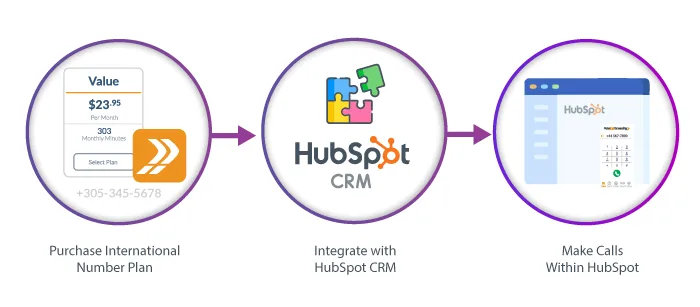
Chart showing how to use the HubSpot Calling Integration with the GCF Softphone.

Once integrated, you can make and receive calls using GCF numbers, access customer details, log call activity automatically, and manage conversations without leaving HubSpot. Calls are routed through the GCF softphone, which supports features like caller ID and call recording, giving teams a unified system for communication and customer engagement.

The result: better productivity, improved call accuracy, and a more streamlined support and sales process.

Benefits of a VoIP-CRM Integration

Integrating your VoIP phone system with your CRM centralizes communication and customer data in one platform—streamlining workflows and increasing productivity.

With VoIP-CRM integrations, teams can make and receive calls directly within the CRM using click-to-call, while incoming calls trigger softphone pops with relevant customer information easily available through the HubSpot platform.

Call activity, recordings, and notes are automatically logged, eliminating manual data entry and ensuring a complete view of each customer touchpoint. This integration helps sales and support teams save time, improve response accuracy, and deliver better service at scale.

How to Use the GCF Softphone with HubSpot

Connect Global Call Forwarding with HubSpot to streamline calling, boost productivity, and improve customer engagement—all within your CRM. With this integration, your teams can:

  • Click to call directly from contact records
  • Use local/global numbers across 160+ countries
  • Centralize communication and call history in one place
  • Automatically log, record, and transcribe every call
  • Analyze call performance and trends via advanced analytics
  • Manage caller ID and number display per region
  • Route calls smartly with IVR and forwarding rules
  • Track sales/support activity across global teams

Whether you’re in sales, support, or operations, this integration helps your team work smarter and deliver better results. Let’s see how:

1. Make and Receive Calls with Click-to-Call

No more copy-pasting numbers or dialing errors. With click-to-call functionality, your team can place outbound calls directly from any HubSpot contact record. One click initiates the call via the GCF Softphone, speeding up outreach and minimizing effort. This saves time and increases workflow efficiency by allowing you to start outgoing calls with a single click on the customer’s phone number.

Incoming calls trigger a softphone pop-up, enabling reps to answer quickly and stay focused on the task at hand.

2. Expand Global Coverage

For global teams and international customer bases, the GCF-HubSpot integration offers a powerful way to scale communication. Global Call Forwarding provides access to virtual phone numbers in 160+ countries, which can be easily integrated into your HubSpot CRM.

This means your teams can make and receive calls using local or toll-free numbers from anywhere—directly within HubSpot. Expanding coverage in key markets boosts pickup rates, builds local trust, and allows you to support customers in-region without needing a physical office.

Learn about the GCF Softphone calling integration for Hubspot CRM

3. Centralize All Communication in One Place

By integrating VoIP calling straight into the HubSpot CRM, you unify business communication in one place. Our HubSpot Calling integration lets you make and receive calls, access contact history, and log call activity — all from within your CRM. This streamlines daily workflows and keeps your team focused on meaningful interactions. Centralization makes it easier for sales and support teams to collaborate, track progress, and deliver better outcomes.

4. Automatically Log, Record, and Transcribe Calls

Every inbound and outbound call made through the GCF softphone is automatically logged within HubSpot. This includes call time, duration, call notes, and recordings. Agents no longer need to manually enter notes or update call histories—saving valuable time and improving data accuracy across sales and support workflows. This ensures complete visibility into the customer journey, helping managers and teams make better decisions.

With advanced features like call recording, transcription, and translation, teams gain more than just a phone connection—they get a record of every conversation. Recordings can be used for training, coaching, or compliance. Transcriptions provide searchable, text-based documentation of calls. And with translation, teams can convert transcriptions into other languages, making it easier to support multilingual customers and global operations while maintaining consistency across teams.

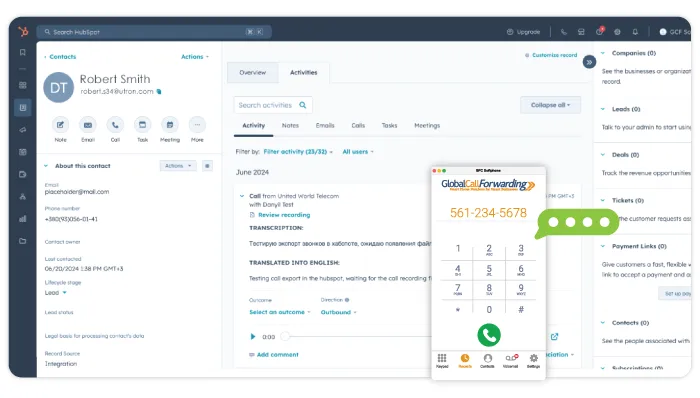
GCF Softphone within a HubSpot CRM dashboard.

5. Analyze Call Metrics for Better Performance

The GCF softphone integration unlocks access to detailed call analytics and custom reports accessible from your Global Call Forwarding dashboard. Track call volume by rep, team, region, or campaign. Use phone tags to identify trends and organize call data.

Monitor missed calls and response times, listen to voicemails and recordings, and more. You can even leverage AI-driven insights like sentiment analysis and keyword search to better understand customer needs and optimize training and performance.

6. Manage Caller ID and Global Numbers

Choose which business number to display when placing outbound calls from HubSpot—whether it’s a local number in your target market or a national number. With Global Call Forwarding, teams can easily manage and use numbers assigned to different countries and regions, enabling them to maintain a local presence while working remotely. Displaying a recognizable caller ID increases answer rates and reinforces your company’s credibility.

These settings can be easily managed from the GCF softphone.

7. Route Calls Intelligently with IVR Integration

Pairing IVR with HubSpot allows businesses to intelligently route calls based on caller input, location, time of day, or department selection. Set up routing and forwarding rules in the Global Call Forwarding control panel and apply them to the corresponding HubSpot phone lines, giving full visibility into each interaction.

Whether a caller presses 1 for sales or 2 for support, the integration ensures a seamless customer journey—and your team knows exactly how the customer was routed and why.

8. Monitor Multi-Location or Global Sales Activity

With our expansive international number coverage and HubSpot’s CRM capabilities, managers can track call volume, success rates, and responsiveness across global sales or support teams. Break down metrics by country, department, or time zone to evaluate performance, staffing needs, and regional campaign effectiveness.

This level of visibility helps you make data-driven decisions to scale efficiently and ensure consistent customer experiences—no matter where your teams or customers are located.

Get Started with the GCF-HubSpot Calling Integration

The GCF-HubSpot Calling integration is designed to simplify your team’s communication workflows while helping you scale globally. From advanced routing to data-rich analytics and AI insights, this integration provides the tools to improve every customer interaction.

Need global phone numbers, reliable call quality, or deeper reporting? Global Call Forwarding supports 160+ countries with advanced features to power your sales and support operations — all from the CRM you already use.

See how easy it is to set up our softphone integration with HubSpot.

Call our telecom professionals at (561) 908-6171 or speak with them online to learn more about our integrations! Implement the GCF Softphone in the HubSpot CRM integration to take your business communication and CRM to the next level!

What is Inside Sales and How is it Changing in 2026?

Inside sales have become the most popular sales model for B2B SaaS and many other high-ticket industries. But what are inside sales, how do they compare to outside sales, and what will the role look like in 2026?

A global health crisis forced millions of people to work from home, and many sales organizations still operate remotely. During this time, new technology also changed inside sales forever.

So, what is inside sales exactly and how is it evolving?

The Meaning of Inside Sales

Inside sales are the exchange of products and services online. It is also known as “virtual sales,” “digital selling,” and “remote sales.” Inside salespeople build sales pipelines through digital channels instead of outside channels.

These are the most 5 common examples of virtual sales channels in 2026:

  • Email
  • Video
  • Chat
  • Phone
  • Social media

The Difference Between Inside and Outside Sales

The main differences between inside and outside sales are travel and the workplace. Unlike outside sales, inside salespeople do not travel to visit clients off-site.

Inside sales are done in an office or remotely, on the computer, and over the phone. On the other hand, outside salespeople meet clients at off-site premises and industry events, usually for entertainment and training purposes.

Inside and outside sales can be combined for greater effectiveness. An example of this is a company that leverages remote sales for leads and account management with an outside sales team that closes bigger deals and conducts in-person training. Also, the two are often paired to upsell and cross-sell solutions.

In past years, inside sales have been considered a backup to outside sales. However, changes in B2B buying preferences have increased the importance of virtual sales in B2B SaaS.

what is inside sales
Source: DepositPhotos.com – Lic#204682470 ID#27446420

7 Advantages of Inside Sales

The inside sales model has many advantages versus outside sales or telemarketing:

1. Scalability

Remote sales teams can quickly scale and deploy new agents in the cloud. For most businesses, their stack of sales tools is cloud-based and does not require extensive implementation.

2. Cost-effectiveness

These days, sales tech is relatively inexpensive. You can equip reps with a full stack of tools for about $200 per rep monthly.

Also, there are no relocation costs for inside sales, as you can hire talent globally to work from home. Outside sales reps carry much higher operating expenses and must travel frequently.

The salary for remote sales reps is also affordable for most companies with positive cash flow.

3. Coaching

Digital sales tools have made it easier to coach inside sales reps.

Certain talk tracks and sales methods tend to win out. As an inside sales manager, you should be fully aware of your team’s playbook and monitor how the team interacts with potential customers. This is not easily achievable when managing a field salesforce.

Conveniently, inside sales are mostly done digitally. Managers in 2026 have more tools and coaching opportunities. This is a result of better collaboration tools, cloud-based CRM, conversation intelligence, recordings, chat transcripts, and virtual writing assistants.

4. Predictable revenue

Companies can predictably forecast and measure the ROI of an inside salesperson.

This is because inside sales reps should have targeted amounts of work to achieve each week. This can include the number of chats and calls answered, outbound dials, sent emails, meetings booked, sales demos, deals won, etc. The work is closely tied to lead generation and in turn, a predictable pipeline, of which the value can be calculated.

5. Global expansion

Whether you want to expand your business to new markets or tap into a diverse talent pool, remote sales offer great potential for global expansion. Prospecting sales can be done virtually from anywhere in the world. 

Because inside sales can be done remotely, companies can easily onboard new reps from other countries. Hiring companies only need to ensure that reps have the right equipment and credentials to use the necessary tools. A global marketplace for hiring can give your business access to better talent at competitive rates.

Inside sales also offer an opportunity to sell your products and services to customers in other countries. The work does not need to be done on-site, which enables inside sales reps to sell to customers anywhere in the world. Companies can even take advantage of international virtual numbers to simulate a local calling presence in the country of their choosing.

6. Fordism

Sales processes can be broken down and assigned to specialized roles. A traditional inside sales process might involve the following:

  1.   Identify target companies that fit your Ideal Customer Profile (ICP) or new clients that fit expansion criteria.
  2.   Identify decision-makers at those target companies. Research potential pain points and service use cases.
  3.   Reach out to decision-makers to understand their pain points. Try to spark an interest in your company and how your solutions could be beneficial.
  4.   Demo the effectiveness of your products and services. Work to close the sale.
  5.   Ensure successful onboarding of new customers. Pursue expansion opportunities.

This type of sales method is kind of like an assembly line. An inside sales manager could assign agents or reps to specialize in each task. The inside sales reps become more effective by devoting their full attention to perfecting and performing a single task. 

7. Comfort

The buyer’s journey in B2B is rapidly changing. Modern buyers prefer live screen-shares and phone calls to in-person demonstrations and face-to-face meetings.

Corporate travel in 2020 also became a lot harder. Starting in 2026, requests for health documents and travel quarantines could become more common. This makes it more difficult for outside sales reps to visit clients on-site, especially in other countries. In addition, many companies are still working from home.

Interested prospects prefer to buy and sell mostly online, and savvy buyers will do more individual research before making a decision. As a result, sales organizations must remain flexible and meet buyers in their preferred mediums.

You can run inside sales from anywhere, which will make it the preferred sales model in 2026.

What Does Inside Sales Look Like in 2026?

Business changed dramatically during 2020. The whole world was quarantined for many months. This forced all executives to do more business online and over the phone, permanently changing how business is done around the world.

Keys to Running a Smooth IS Organization

There are several components that are required to run a successful inside sales organization:

  • Software

Equip managers with the right tools: CRM, call recordings, conversation intelligence, etc. Similarly, inside sales agents should have the right tools; high-speed data, sales automation tools, calling service with web dialer, writing assistants, external data, etc.

  • Specialization with well-defined roles

Inside sales reps are more effective when assigned to specialized roles. For example, your team should have specialized reps who identify target companies and decision-makers, other reps who reach out to those decision-makers to spark an interest, and closers who can properly communicate the value of your services and win deals.

  • Sales & marketing alignment

Marketing and inside sales should be in close contact. It is the job of marketing to create brand awareness and interest and also to supply inside sales reps with the proper enablement resources to do their jobs effectively. This is when SaaS marketing agencies and general marketing firms come in handy, as their expertise can be instrumental in creating effective strategies for brand awareness and interest. Ideally, prospects should know about your business before salespeople reach out.

  • Sales process

The process is key for an digital selling organization looking to scale. Ideally, managers should implement repeatable processes and properly educate their inside sales reps. This makes it easier to expand the team and in turn, grow revenue.

  • Morale & a good product

In order for salespeople to do a good job, they must believe in what they’re selling and understand its value. No righteous salesperson wants to deceive buyers and sell crappy products. They should be confident in the services that they’re selling.

Day in the Life: Inside Selling Techniques

A typical day in the life of an inside salesperson involves various tasks and responsibilities, with most days spent fielding inquiries, following up with leads or clients, prospecting online, and doing admin work. Depending on the company, the job of an inside salesperson might carry over after-hours. Results come from the work that salespeople put in.

5 Skills of a High-Performing Inside Salesperson

There’s a misconception that salespeople need to be smooth talkers in order to succeed. While being articulate in conversation helps, there are more elements of a successful salesperson.

In fact, many sales leaders believe that active listening is the number one digital selling skill. These are other valuable skills:

  1. Active listening
  2. Genuine curiosity
  3. Consultative approach
  4. Rapport building
  5. Strong network

What Business Is Most Likely to Benefit from Inside Sales?

Does your business need remote sales? Well, it depends on where your company is in its lifecycle. It also depends on the sales cycle complexity and contract values.

Scaleups, startups, and SaaS companies are most likely to benefit from having an inside sales team. Many startups have used inside sales to hustle their way to $10 million or more ARR. Many companies will also invest in a digital selling team during their growth stages.

Future of Inside Sales: Will it Be Different in 2026?

We saw how work shifted from in-office and in-person to fully remote during the pandemic. Video conferencing exploded. Demos and screen sharing also took off. The digital funnel and virtual selling pretty much replaced in-person lunches and dinners. We don’t see many more changes occurring in the near future.

 The Bottom Line: Compared to this year, inside sales processes in 2026 will not be much different. Most changes to remote sales already happened in 2020 and are here to stay.

7 Proven Tips to Deal With Difficult or Angry Customers

Dealing with a difficult or angry customer can be tricky, yet it is a common occurrence in the customer service industry. And because it happens so often, customer service employees and agents need to be prepared to deal with such customers. In this post, we discuss 7 proven tips to help you deal with difficult customers while doing your job effectively!

Dealing with Angry Customers? Try These 7 Tips

Quite often customer service teams are not trained specifically to deal with angry or difficult customers. This can lead to conflicts and the loss of a potentially valuable customer. For this reason, it is important to practice the below tips so you are better equipped to work with difficult customers.

1. Adopt Active and Reflective Listening

The first step to dealing with an angry customer is identifying the issue. And to do so, you need to listen carefully. Listen to your customer actively to identify what their concern is so you can find the appropriate solution. Another tactic is reflective listening where you pay attention to what the other is saying and then respond by reflecting the thoughts and feelings heard. For example:

Customer: “I’m annoyed because your service has the features we need but does not fit our budget.”
Agent: “What I understand is that your budget is limited and we are not offering you any discounts or promotions that fit your requirement.” Or, “Tell me more so that I can understand better and find the right solution for you.”

When you are practicing reflective listening, be careful not to promise a definitive solution to the problem. For issues such as pricing, you will need to check with supervisors and managers before you give the customer exactly what they need. But when interacting with the difficult customer, you must focus on listening and identifying the issue while making them feel heard.

2. Keep Calm and Focus on the Process

It is easy in a hostile situation to lose your calm (even slightly) and get nervous. However, remember that conflict and disagreement are common in business. But how you respond to conflict is essential because it determines your relationships with your employers as well as your customers.

Even in the heat of the moment, make an attempt to treat your customers with respect and consideration. Lower your voice, take deep breaths, and maintain a professional tone. Additionally, try to resolve disputes while over the phone. And ask for help, if you need it.

3. Try to Genuinely Empathize with the Customer

Besides listening to the angry customer, try to empathize with them. Call them by their name, instead of “sir” or “ma’am.” Pull up their customer records so that you know their history with the company. Make them feel heard and valued and treat them as an individual person as opposed to just another customer. This can go a long way in calming the customer down and arriving at a solution.

Related: 23 Incredible Customer Service Tips for 2022

4. Use Support Resources

Most businesses should have some kind of knowledge base or support center that agents and employees can use when dealing with difficult customers. If your company does not have one, it may be helpful to suggest it. This knowledgebase can help you:

  • Walk customers through common processes
  • De-escalate conflict with useful strategies
  • Set up audio/video recording
  • Get help from a fellow employee or supervisor

5. Demonstrate That You Are Taking Their Issue Seriously

Provide realistic solutions and avoid sounding monotonous. If you are repeating a script that you use with other customers without personalizing it, the customer will recognize this and become even more agitated. You need to demonstrate that you are taking their case seriously without simply saying it.

6. Don’t Take it Personally

This is hard to do when certain angry customers target their anger towards you instead of the issue they are facing. However, remember that this is not a personal problem. At the end of the day, the customer does not know who you are. And since you are the only way they can interact with the company, their anger is targeted towards you. Avoid taking it personally and attacking the customer back. Instead, apply the above tips to diffuse the tension.

7. Follow Up and Ask for Help, if Needed

Finally, if the problem is above your paygrade or the interaction gets too intense, then it may be prudent to ask a co-worker or manager for help. Let the angry customer know that you will contact them again with a solution or to follow up, and make sure that you do.

Related: 9 Best Customer Service Examples for 2022

Dealing with Difficult Customers Can Be Hard, But Not Impossible

Different customers will require different methods of interaction. Similarly, dealing with angry customers needs time and patience. Use your discretion but learn from mistakes. And when in doubt, don’t hesitate to ask for help from managers and bosses who may be able to offer additional options for handling tricky situations properly.

The Ultimate Pre-Call Checklist [+Free Download]

With sales driving business growth, there is a lot of pressure to perform well on B2B sales calls. And while selling comes naturally to some people, it is always a good idea to prepare for each call.

A pre-call checklist for sales calls will help you organize your conversation and cover all key points. Additionally, it acts as a guide you can rely on to continue the conversation forward. Let’s have a look!

Need a copy to share with your team? Scroll down and download the PDF!

Preparing for Sales Calls

So, how can you best get ready for sales calls? This preparation generally starts with getting to know the prospect, both the individual you will talk to and their affiliated company.

That aside, it also involves personalizing the conversation to meet this particular prospect’s needs. For this, you’ll look at

  • solutions and services that help them
  • questions they might have
  • objections that may dissuade them from purchasing, and so on.

And since all of this happens before you make the call, they reside in your pre-call checklist.

Who Can Benefit from a Sales Pre-Call Checklist?

A pre-calling checklist will help you prepare for different trajectories the conversation may go. At the same time, you can make sure you’ve discussed everything you need to before ending the call. And so, this checklist is useful for anyone who interacts with prospects as a way of converting them; this includes:

  • Sales professionals – sales leaders, managers, and sales reps
  • Outreach specialists
  • Market research and survey professionals, and so on.

Sales Pre-Call Checklist

So, without further ado, here’s a pre-call checklist for your inside sales team, we’ll cover the following:

  1. Research Your Prospect
  2. Know Who You are Speaking to
  3. Decide What You Will Say
  4. Establish Realistic Goals
  5. Prepare Key Questions to Ask
  6. Consider Objections and Questions the Prospect May Have
  7. Keep Sales Enablement Resources Nearby
  8. Prepare to Call

1. Research Your Prospect

To pitch effectively, you need to understand who your prospect is; this means, research. Often with cold-calling sales, people tend to just call without doing their due diligence. Customers can easily tell when you haven’t done your research and nothing dissuades them faster than someone faking it. After all, how can they trust the business you represent, if they can’t trust you?

To improve your chances:

  • Research your prospect’s business and industry — What do they do? Where do they stand in the industry (experts, start-ups, newbies)?
  • Browse their website and core pages — Look at company values, mission statement, ‘About Us’ and ‘Our Team’ pages, products and services, etc.
  • Review their social media pages — What are they talking about? What is top of mind for them?
  • Check press releases and news about the company — Mergers, new features, awards, new locations, CSR initiatives, etc.

2. Know Who You are Speaking to

Next, take time to identify who in that company you are talking to. This will help you make your pitch more relatable and relevant to them.

  • Review your CRM platform, sales spreadsheet, or Sales Engagement Platforms (SEP) list
  • Understand this prospect’s relationship and past interactions with your company
  • Research the individual you will speak with — What is their job profile? Potential pain points? What do they care about? Look at social media profiles and posts
  • Determine where they land in the sales funnel — Are they aware of your product or still in the research phase? Map out their journey
  • Look for any overlap in professional networks that can connect you to the prospect.

A chart for understanding sales prospects' journeys.

3. Decide What You Will Say

Then, with all this customer information in the background, decide how you will approach the prospect and what you will say:

  • Review your script and the solution you will pitch
  • Consider adopting a “talk tracks” approach (more on that below)
  • Determine how to discuss the product or service’s strengths and weaknesses
  • Prepare your value proposition by persona — how is your product different from others for this particular prospect and industry
  • Plan out and practice your voicemail, in case the prospect does not answer.

Our Sales and Marketing Manager, Luke Genoyer recommends: “I’m a proponent of using “talk tracks” versus scripts. This is when the salesperson tries to uncover certain things in the conversation by asking open-ended questions, following a certain track, and nurturing the conversation naturally instead of adhering to a rigid script.”

He also highly recommends planning out and practicing personalized voicemails a few times before jumping in on the call.

4. Establish Realistic Goals

Next, determine what you want from this call. In other words, what are your goals for this call? This depends on where you are in the sales cycle and where your prospect is in the buying journey. Choose 2-3 goals before going into the call so you can manage your expectations effectively.

  • Understand the prospect’s company and challenges (questions to consider below)
  • Get names of important contacts to can connect with the right person
  • Qualify the lead to decide whether it is worth going after this prospect
  • Make a presentation
  • Provide informative brochures or data sheets
  • Educate the prospect and book a demo
  • Sign up for a free trial
  • Set up follow-up calls or interactions
  • Determine a sales timeline with a close date, keeping their journey in mind
  • Consider sales performance goals (duration of call block, number of calls, and number of positive outcomes).

Related: 18 Tips to Increase Call Center Sales

5. Prepare Key Questions to Ask

Another important strategy to include on your pre-call checklist is preparing questions to ask your prospect. Asking the right questions will help you better understand what is important and relevant to them. It will also show them that you understand what they do, how they operate, and their role in the industry. All of this, in turn, will help you sell your product better.

Note that these questions should work as a guide and not as a script. Additionally, they should be thoughtful questions that can start a conversation instead of simply using a one-size-fits-all method.

Here are some examples:

  • As a network engineer, what’s your most important priority right now?
  • What features do you wish [an operation] had, that it doesn’t currently have now?
  • What’s the biggest problem that you want to solve or fix?
  • From your conversations, it seems that your biggest roadblock is . . . Would you agree?

These questions differ based on the buyer’s journey, product development, customer research, and so on. However, you can always practice active listening to generate thoughtful questions.

6. Consider Objections and Questions the Prospect May Have

As you list down your questions to ask, you also want to anticipate questions or objections your prospect may have. Common reasons and types of sales objections include the lack of need, urgency, trust, or money.

With this and your research of the prospect in mind, you can be proactive in pitching the right solutions and explaining the need and relevance. Here are some ways to prepare:

  • Think of common objections your team deals with during sales calls
  • Review other obstacles such as stakeholder buy-in or undeveloped products/features
  • Determine ways to highlight credibility
  • Go over how you may negotiate contracts or pricing, if applicable
  • Create/use an objection handling sheet

7. Keep Sales Enablement Resources Nearby

Finally, you’ll need your resources and sales content to share during or after the call. This includes but is not limited to:

  • Sales deck or demo video
  • Product data sheets
  • Brochures for different stages of the buying journey — awareness, consideration, purchase, retention
  • Case studies or customer stories
  • Research reports
  • Compliance documentation
  • Relevant videos, blog articles, how-to guides, and so on.

You want to keep all these within reach so you can grab what you need quickly without having to waste time looking.

8. Setting Up Your Space

With all the above done, you’re ready to make the call. The last item on your sales pre-call checklist is setting up your space. This is a crucial step in ensuring that you’re in the right mindset to make this call. Here are our favorite pre-call practices:

  • Create a distraction-free zone — Close chat and email, and silence notifications
  • Open your CRM platform
  • Keep resources close by
  • Visualize outcomes — Generate a positive mindset and remember that your solution helps people

Start Calling with the Right Sales Tools

And with that, you’re ready to go!

Pre-call planning can seem daunting, especially with a checklist that looks this long. However, over time and with practice, this process will become second nature for you. And it will seem less tedious and more rewarding when you cover all your bases beforehand.

Remember the key takeaways: Know who you’re talking to, why your product will help them, and what you want out of the call. Everything else is there to support you and help you reach your goal.

Happy calling!

And, don’t forget to keep our handy downloadable sales pre-call checklist on hand.

Download Your Free Sales Pre-Call Checklist Here

Sales pre-call checklist download.
Download Our Free Pre-Call Checklist
Download this handy pre-call checklist for your next sales call.

Pre-Call Checklist

What is B2B Sales?

Sales are what drive B2B companies to achieve target revenue and growth. But new technology, customer preferences, and competitive markets mean that selling is becoming more and more difficult.

This is why it’s important to understand how exactly B2B sales can support your business. In this comprehensive guide, we’ll discuss what B2B sales look like and how you can leverage various strategies to your advantage.

In this guide, we’ll cover:

Let’s get started!

Understanding Sales for B2B Companies

Business-to-business (B2B) describes a relationship between two business entities. This could include professional services (like consulting or market research), digital software and services (like VoIP, CRM, ERP optimization, project management, and cloud computing), raw materials (like steel to manufacturing companies), etc.

And a B2B business—whether you run a brick and mortar or sell online without a storehouse—or will utilize sales and marketing functions to bring in new customers along with customer service employees to support these new customers.

Let’s look at B2B sales in particular.

What is B2B Sales?

B2B sales or business-to-business sales is the process of selling products and services to other companies rather than individual consumers.

B2B sales are typically conducted between:

  • a manufacturer and a wholesaler,
  • a wholesaler and a retailer,
  • two businesses without any intermediaries.

Since these include sales between two business entities, you can usually expect:

  • Higher price points
  • More complex sales cycles
  • In-depth product knowledge and custom solutions
  • Contracts and/or recurring subscriptions
  • Inside sales at various touchpoints, and more.

B2B versus B2C: How are they Different?

B2C sales or business-to-consumer sales are made from a company to a consumer. B2C sales are usually smaller than B2B sales.

To put this into perspective, Forrester’s B2B e-commerce forecast found that US B2B sales had a record-breaking growth of 22% year-over-year (YoY) in 2021. This is mainly because B2B companies work with other businesses that make large profits and revenue. And these companies have more targeted marketing opportunities and bigger budgets.

Additionally, the decision maker in B2C sales is the individual consumer. On the other hand, in B2B sales, the decision makers are the multiple stakeholders of a business. This means that B2B buyers go through a longer sales cycle than B2C buyers.

Related: Inbound Sales vs Outbound Sales

Who is a B2B Sales Rep? Job Description and Responsibilities

B2B sales representatives engage with prospective buyers and encourage them to make a purchase by providing information, personalized demos, and more.

Currently, corporate buyers tend to do their own research before reaching out to a business for a product. This research involves understanding different solutions available, conducting a cost analysis, reviewing competitor offerings, and more.

The B2B sales rep then helps the customer understand why their company’s product is the best solution. To this effect, they work closely with the customer, identify pain points, provide solutions, and more. This is where sales skills like active listening, being respectful and goal-oriented, and building relationships come into play. And all of this encourages the customer to make a purchasing decision.

Common B2B sales rep responsibilities include:

  • Make and receive calls
  • Manage sales emails
  • Set up meetings
  • Conduct product demos
  • Prospect for new business
  • Build rapport
  • Overcome objections
  • Follow up, and more.

B2B Funnel

To sell effectively, you need to understand the buyer’s perspective and what your B2B customer journey looks like. And using a visual tool like the funnel is a good place to start.

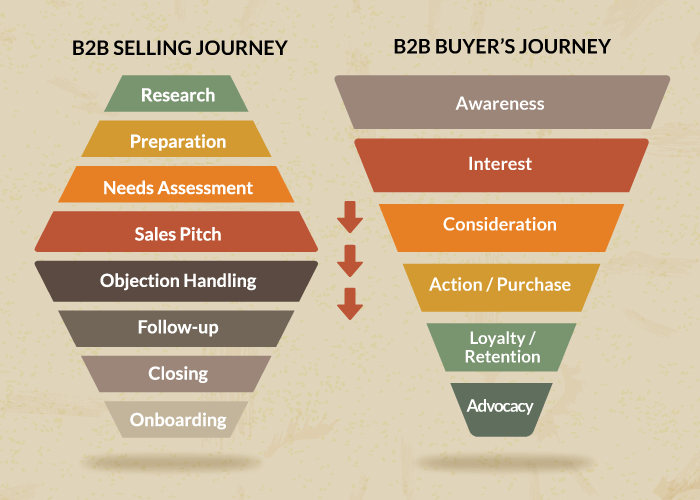
A B2B funnel is the visualization of a prospect’s journey from discovery to post-purchase. The different stages of the funnel depicting the B2B buyer’s journey include:

  • Awareness
  • Interest
  • Consideration
  • Action / Purchase
  • Loyalty / Retention
  • Advocacy

With that in mind, here’s what the buying journey looks like:

  • Identify pain point(s).
  • Research potential solutions, check out review sites and social media, ask for recommendations, and find a vendor(s).
  • Talk to the salesperson to understand how the product can solve their issue and understand the implementation process.
  • Take this information back to the decision-maker at the company and evaluate the vendor.
  • (if all goes well) Make a purchase and implement the solution.

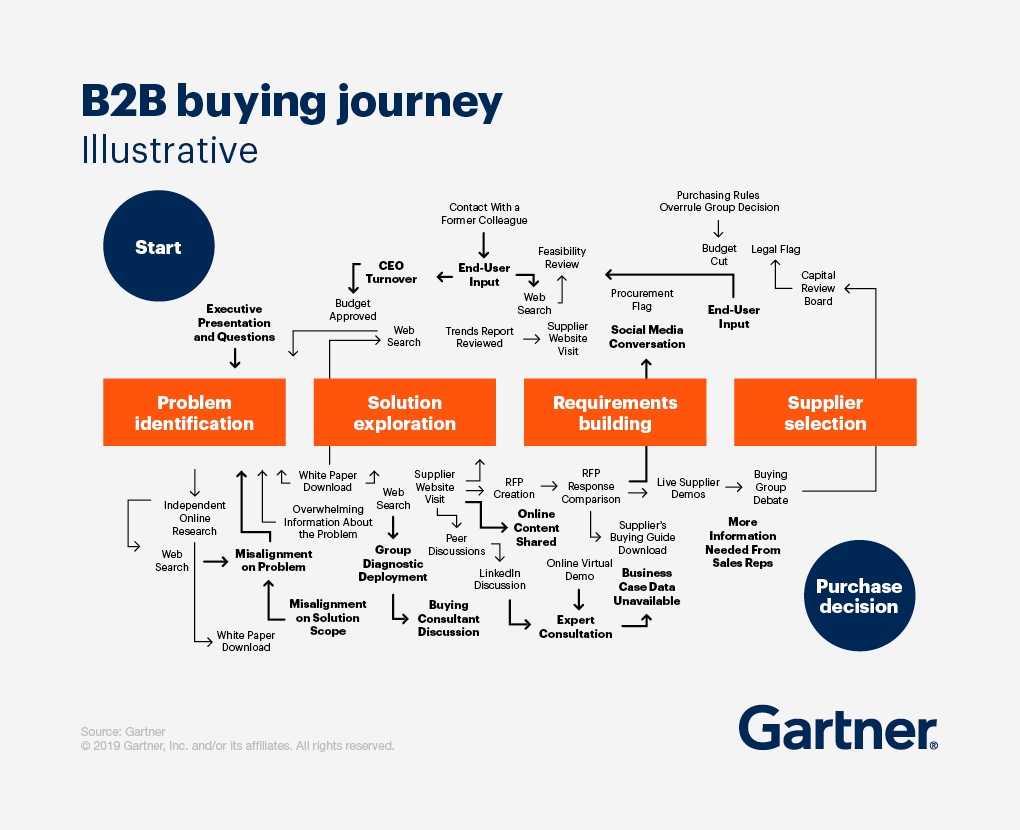
As you can see, the buyer’s journey isn’t straightforward. But, understanding how it works will help you develop your company’s sales process

The buyer's journey in a B2B sales process.

B2B Sales Process

B2B sales, in particular, is a complex process that uses various sales techniques for different buyer personas, use cases, and selling situations.

First, to lure these buyers in, the company’s marketing and sales teams do what they do best. Organizations are finding more success when their marketing and sales teams work together to boost lead generation. This involves offline and online marketing, cold calling and outreach, and more.

Once the lead is in the door, the B2B sales rep nurtures the lead.

The B2B selling journey, therefore, may look like this:

  • Preparation and research
  • Prospecting and lead or demand generation
  • Discovery and needs assessment
  • Product demo and sales pitch
  • Objection handling/negotiation
  • Follow up
  • Closing
  • Onboarding and customer success management

Keeping this in mind, the B2B sales process is usually split into the following functions:

  • Sales development — identifying and engaging decision-makers, nurturing leads
  • Closing deals — helping prospects make a purchase
  • Onboarding — bringing new customers on smoothly
  • And customer success — checking in with existing customers and helping them make the most out of your product.


Challenges to Keep in Mind

Your business can utilize B2B sales to create a better and more efficient customer journey. But part of developing a B2B selling strategy is to be aware of challenges that might impede progress. The most pressing concerns include:

  • Limited-to-no training
  • Misunderstanding or unawareness of key goals
  • Sales and marketing misalignment
  • Outdated sales culture
  • Slower adoption of supportive call center technology
  • Operational inefficiency

Keeping these in mind, let’s look at some ways your business can overcome these obstacles.

B2B Selling Techniques and Tips

About 77% of customers say that their buying journey was hard or complex — from searching for the right solution to getting stakeholder buy-in.

So, your B2B sales process must include techniques and strategies to connect with prospects effectively at all of these touchpoints — from awareness, consideration, purchase, and retention.

Here are 5 strategies to broaden your B2B sales approach:

1. Research and get to know your prospect: The most important step to any successful sale is researching the customer. Who are they, what do they need, and what are their pain points? Take time to talk to them or use available resources to understand their needs better.

2. Collaborate with other departments: Work with marketing, product development, and tech support to get a single and wholesome view of customer data. This collaboration will help you understand what messaging is important, what resolutions are useful, which features are popular, and so on.

3. Consider AI and automation: Use AI and reporting technology (with RAG fine-tuning) with key insights and forecasting to drive your sales. Furthermore, use automation solutions to help salespeople focus on more complex tasks instead of spending time on mundane ones. Also, more and more B2B customers are opting for seller-free buying. So, while you optimize your B2B sales process, consider including self-service solutions that let lower-end customers purchase your product sooner.

4. Be proactive and responsive: Nurturing corporate customers takes time and patience. So, make sure your sales reps are accessible whenever your prospect might need additional support. Train reps to proactively solve problems, make recommendations, and respond to queries quickly. Being available goes a long way in building trust.

5. Focus on building relationships: Instead of racing the clock on closing the sale, encourage sales reps to build meaningful relationships with customers that promote trust and loyalty.

20 Key B2B Sales KPIs

Another important B2B strategy is measuring performance. Analytics help you understand if your teams are close to achieving key sales goals.

You can track a variety of KPIs to measure sales performance, productivity, revenue, and more. In fact, the list of business KPIs and metrics continues to grow as new reporting software is introduced.

But let’s keep it simple.

Here’s a list of the top 20 B2B sales KPIs to measure:

Lead generation

1. Leads — number of leads coming in monthly or annually
2. Source of leads — where leads are coming from
3. Lead quality — to determine the likelihood of prospects becoming paying customers
4. Performance of qualified leads — likelihood of qualifying leads that convert
5. Lead-to-opportunity ratio — how many leads turn into sales opportunities
6. Avg lead response time — measure time needed to follow up with a prospect

Sales productivity

7. Sales pipeline velocity — time taken by a prospect to move from lead to customer
8. Sales close rate / percent of closed deals — percentage of your closed-won deals every month
9. Time spent running demos — how much time is required to demonstrate the product’s usefulness
10. Time spent on the phone — time spent on closing phone deals
11. Win-loss ratio — calculation of won deals over lost ones

Revenue tracking

12. Sales volume by location — to understand where demand is growing and/or lacking
13. Percent of sales discounts — which discounts are most efficient
14. Customer acquisition cost — how much is spent on each lead that converts to a paying customer
15. Return on investment (ROI) — effectiveness of marketing and sales activities
16. Monthly recurring revenue (MRR) — understand recurring revenue
17. MQL vs SQL conversion rate — ratio of marketing leads that convert to sales leads
18. Cost of marketing — effectiveness marketing strategies in boosting sales
19. Customer satisfaction — important customer success metric
20. Customer lifetime value — how much net profit a business can make from one customer over time

The Future of B2B Selling

Since the global pandemic, industry experts are seeing more hybrid sales roles as well as customers preferring remote and self-service interactions themselves. This means that your business needs to rethink how it sells to customers in a virtual space. Some strategies to consider as we embrace a different path forward:

  • Focus on the customer and adopt customer-first strategies
  • Diversify your communication and selling channels
  • Collaborate with other departments to understand what customers want from your organization in this day and age
  • Upskill and promote your existing sales reps and provide access to resources and training
  • Include cloud communication technology that makes it easy to sell from anywhere.

Our Sales and Marketing Manager, Luke Genoyer offers his insights:

  • Salespeople have less time with buyers, so they need to make their interactions more valuable — especially since there’s a lot more “noise” for salespeople to cut through
  • Encourage collaboration with marketing and product to improve website/marketing assets and customer experience
  • Sales professionals should invest in their own online “brands” to promote credibility.

With these tips in your pocket, your business is gearing towards entering a new phase of B2B selling. Good luck!

To learn about our cloud communication solutions for B2B sales teams, chat with our experts online!

Understanding Rate Centers and Local Calling

If your business deals with customers from different parts of the country, then you need to pay attention to the areas covered by rate centers to provide accessible and affordable customer support to your customers.

Here’s a quick overview of what rate centers are and how they affect local calling.

Rate Center Coverage for VoIP Services

Rate centers, in short, determine which calls incur local rates and which incur long-distance rates. This is crucial to understand where your callers are located and how you can continue to serve them without then paying long-distance rates to call your business.

What is a Rate Center?

A rate center is a geographic location or area that determines what constitutes a local call and long-distance call. A Local Exchange Carrier (LEC) uses rate centers to manage local calling and pricing and assign phone numbers based on local area codes.
Each rate center will have a:

  • Geographic place name (city or state associated)
  • Nominal physical location (co-ordinates to determine distance)
  • Local area code (NPA)
  • One or more prefixes (NXX)
  • Specific local calling area (list of other rate centers to which local calling is provided).

In a nutshell, a rate center helps regulate the rates of phone calls within an area. And there are more than 15,000 rate centers in the US.

What Do Rate Centers Mean for Local Calling?

Rate centers help determine which calls are local and which are long-distance so that they can be charged accordingly. Calls within a rate center (geographic area) are usually considered local calls. And calls made from one rate center to another are considered long-distance calls.

US Rate Centers

Within the North American Numbering plan, we have multiple US area codes and rate centers. To find the rate center for a particular number, you will need the following information:

  • Area code — 3-digit number
  • Number prefix — first 3 digits of the number that follows the area code

You can visit the US prefix/rate center locator to find the rate center for your phone number.

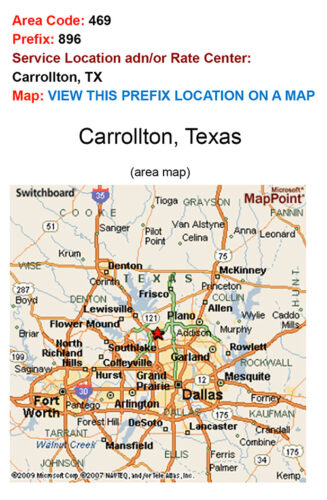
Let’s look at an example. In this phone number 469-896-3563,

  • Area code is 469
  • Number prefix is 896

When you input this information in the rate center locator, you will find out that the rate center (geographical coverage) is Carrollton, Texas, United States, along with a map for reference.

Texas map

How Do Rate Centers Affect Local Communication for Businesses?

So, what does all this information mean for your business? Understanding rate centers and what constitutes a local call can help you understand where most of your callers are calling from.

Track incoming calls to and run those phone numbers through the rate center locator. This will give you a general idea of where potential prospects and customers are located. You can then customize their caller experience by:

  1. Using local phone numbers to let callers call your business for local rates, and
  2. Routing incoming calls to a regional office for local support with call routing software.

You should pay attention to rate centers when

  1. Buying a new local phone number — check with your new service provider how callers will be charged for calls made to your business with your new service provider.
  2. Porting your VoIP number to a new service — not all carriers support every single rate center; be sure to check with your new carrier.

Local Calling with Global Call Forwarding

Global Call Forwarding offers local phone numbers from all cities and states in the United States. Our service and call reports let you identify what regions your customers call from. You can then buy local numbers for those areas and route incoming calls to your main office located anywhere in the world, not just the US. Callers will pay their regular local calling rate and nothing more. Chat with us online to learn more or request a demo today!

10 Voice of the Customer Methodologies to Revolutionize Customer Feedback

Everyone is talking about Voice of the Customer (VoC) data as an essential tool to understanding your customers and improving their experience. But what is VoC and how do you collect such data? Here is a detailed guide to what VoC is and what to keep in mind when collecting customer data through these top 10 Voice of the Customer methodologies.

Voice of the Customer: Definition and Methodologies

First, what is Voice of the Customer? VoC is the way your customers talk about your products and their experiences or interactions with these products and services. It is a market research method where a business collects detailed customer feedback about their products and services used.

Why is VoC Important?

So, why should you collect customer feedback and pay attention to the voice of the customers? Customers using your product are in the best position to explain how useful, user-friendly, and worthy your product or service is. When collecting VoC data, look for:

  • Customer pain points
  • Hesitations or objections
  • Desires and needs
  • Requirements and expectations
  • Benefits, usage, results

And so, learning how they use the product and how successful it is in helping them complete tasks will help your business create better products as well as market your current products more effectively.

By collecting VoC feedback, your business can gain:

  1. Comprehensive and detailed insights into what your customers look for and need from your products and services.
  2. Data that can be put towards product development and marketing efforts.

VoC Program Stages

A VoC program — that is, collecting and using Voice of the Customer data — typically involves three stages:

  1. Collection — Collecting feedback and information via interviews, surveys, polls, etc. related to specific products or services.
  2. Evaluation — Analyzing and studying responses to identify customer needs and expectations.
  3. Implementation — Using feedback and analysis to create better experiences and products that boost business performance.

Voice of Customer Program Stages.

In this post, we will specifically focus on the collection phase of VoC data and what methodologies work best.

And when collecting VoC data, it is good to be prepared with the following questions for each data collection project:

  1. What is the purpose of this data collection project?
  2. What is your target audience or group? (Current customers or new prospects?)
  3. How will you collect this data? (In-person interviews, online surveys, social listening, etc.)
  4. What stage is the customer or prospect in? (Unaware, problem aware, solution aware, product aware, most aware)

Once you have these factors in place, you can focus on questions to ask your customers and prospects.

What to Ask Customers?

Before we dive into VoC methodologies, let’s quickly run through how to prepare for customer interviews and surveys. In other words, what questions to ask your customers so you can get the best feedback and insights. Your questions can be focused on how customers perceive your business or how they use your product or service; customize questions accordingly. Here are some questions to consider:

What made them look for your business/product/service?

  • When did you realize you needed something like [product/service]?
  • What brought you to [business/product/service]?
  • How did you find out about [business/product/service]?
  • What problem were you trying to solve with [business/product/service]?
  • How did you go about researching for a solution to your problem?

How or why do they pick a business/product/service?

  • What matters most to you when choosing or signing up with a business or purchasing products or services?
  • What characteristics do you look for in a business, product, or service before purchasing or signing up?
  • Why were you interested in trying our [product/service]?
  • Did you consider any alternatives to our [business/product/service]? What were they?
  • Why did you choose our [product/service] over [competitor]?

About your business/product/service

  • What comes to mind when you think about our [business/product/service]?
  • How are you using our [product/service] at the moment?
  • How would you describe the [business/product/service] to a friend?
  • What do you like the most about [business/product/service]?
  • What is the most useful feature of the [product/service]?
  • What surprised you about [business/product/service]?
  • Would you recommend [business/product/service]? To whom and why?
  • How can [business/product/service] improve your customer experience?
  • How can [business] improve the [product/service]?

Understanding pain points, concerns, and issues

  • What would you like changed or modified regarding the [product/service]?
  • What features do you wish the [product/service] had, that it doesn’t currently have now?
  • What concerns do you have about [product/service]?
  • What competitor would you prefer over our [product/service]? And why?
  • What’s the #1 thing you can do with [product/service] that you couldn’t do before without the [product/service]?
  • What’s the biggest problem that you were able to solve/fix with our [product/service]?
  • What concerns or hesitations did/do you have before deciding to buy or sign up for [product/service]?

Understanding results and outcomes

  • What has changed for you since using [product/service]?
  • What measurable results have you noticed since you started using [product/service]?
  • What results are you hoping to achieve with our [product/service]?
Voice of Customer methodologies.
Source: DepositPhotos.com – Lic#61863947 ID#27446420

Top 10 Voice of the Customer Methodologies

Let’s now look at the 10 different Voice of the Customer methodologies that you use to collect customer data:

1. Detailed Customer Interviews

One of the traditional VoC data collection methods is conducting detailed interviews with consumers. These interviews can help you get insights into the customer’s perspective about your business or specifically about a product or service you offer.

You can conduct in-person, phone, video, or email interviews, depending on your capabilities. However, in-person interviews are considered the most effective for this purpose. You can choose to interview particular customers or target groups, depending on why you are collecting this data and how much information you need.

Be prepared with a list of questions and follow-up questions before conducting the interview. Inform customers how long this interview will last and what the purpose is.

2. Customer Surveys & Feedback Forms

A customer survey is another good (and common) way of collecting customer information and understanding customer expectations, needs, and pain points. There are a few different ways to send out customer surveys:

  • Online surveys through links or emails through survey tools such as SurveyMonkey
  • Phone surveys through customer service teams or automated IVR systems
  • In-app or in-software surveys
  • In-person or suggestion-box surveys
  • Contact forms surveys, etc.

You can send out such surveys and feedback forms when prospecting new leads or to new and long-term customers. As mentioned above, be prepared with questions to include in your survey form. When appropriate, include and offer multiple-choice options, drop-down lists, text-boxes, and so on. This will enable customers to provide more information and give you detailed results.

3. Customer Reviews

Online customer reviews are a great spot for collecting information about how customers are using your products and determining how they feel about them. You can look up Google reviews as well as industry-specific review sites such as G2, TrustPilot, Capterra, etc.

Additionally, since these reviews appear online and are visible to potential customers, you will want to watch these reviews and respond to them as well. Respond to good reviews with “We appreciate your business.” And respond to negative reviews with positive and solution-focused responses. In other words, show new prospects how your business handles negative reviews and customer concerns.

Related: Global Call Forwarding Reviews

4. Call Detail Records

Call detail records can be helpful when putting together insights and data based on history. You can use call records to understand the preferred communication channels and contact times. Additionally, you might even identify common complaints that require the help of your customer support team. This information can be used to create support content that helps customers solve issues through self-service options, when appropriate.

5. Recorded Calls

Next, record and review calls with customers. A call recording service is a great tool for sifting through common customer needs, expectations, and complaints. Here, you can identify patterns, anomalies, and more. These insights can then inform better product development and enhanced customer experience.

6. Email Groups

You can use highly personalized emails to specific segments or send well-written generic emails to all your customers. Make it easy and less work for your customers to answer the survey. You may choose to include the feedback form or poll within the body of the email or include a link for them to click. Let them know the purpose of the survey and how long it will take them to complete it. You may even choose to include a reward for a lengthy survey that will take up a good amount of their time.

7. Social Listening

Social listening refers to paying attention to what your customers and clients are saying on social media platforms. More specifically, what are they saying about businesses, products, and services like yours? You can choose to simply listen or actively participate in the conversation to learn more about customer expectations and interests, directly from customers and in real-time.

8. Live Chat

Live chat (whether monitored or AI-enabled) is a popular customer support channel. Web visitors often use live chat to connect with a company as opposed to calling or emailing them. This makes live chat a good source for collecting VoC feedback. You can collect feedback by asking questions in real-time or scheduling a follow-up survey after assisting the customer.

9. Focus Groups

Focus groups are groups of people who asked to share their thoughts, feelings, and expectations about a product or service. You can use focus groups to test new products or features, gain feedback on existing products and services, learn how to improve user experience, and more. This is another common way of understanding the Voice of the Customer at different touchpoints.

10. Customer-Focused KPIs

There are two customer-focused KPIs or metrics that can help you gain insights into how satisfied your customers are and whether they will advocate for your brand:

1. Net promoter score (NPS) measures the loyalty of a business’s customers. NPS provides quick feedback from customers focused on whether they are likely to recommend your product or service. A common example of this is — “How likely are you to recommend our [business/product/service] to a friend or a colleague?

2. Customer satisfaction score (CSAT) measures the level of customer satisfaction after interacting with a business or using a product or service. Use questions similar to those in NPS measures and customers can answer with ratings such as a scale of 1-10 or range of Very Satisfied-Very Dissatisfied.

Let Voice of the Customer Methodologies Enhance Your Services

It’s not an underestimation how important customer satisfaction is, and companies should aim to ensure they are delivering on this fully. As we have demonstrated, Voice of the Customer data is a key tool for businesses to understand what customers appreciate about your business, and ultimately, where your business can improve. If you are aiming to maximize the experience for your customers, be sure to implement VoC methodologies and learn more about how to please those seeking out your products or services.