

Home » Archive by category 'Integration'

Why Europe is Cracking Down on In-Country Caller ID via International Routes

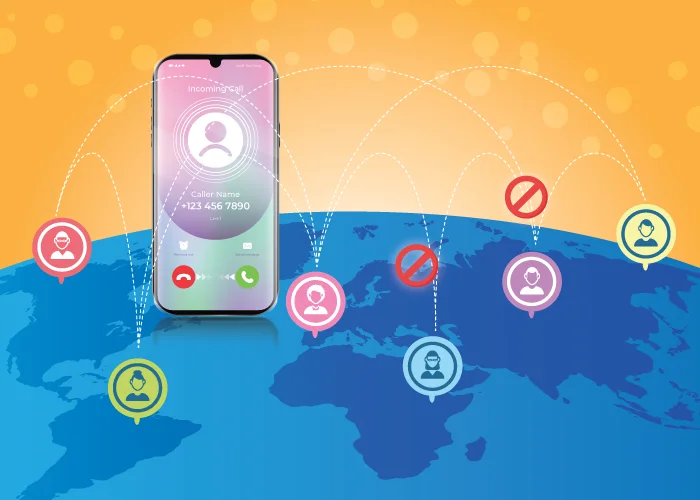
Global map with caller ID icons and regulatory symbols illustrating European telecom restrictions.

Europe is tightening regulations around in-country caller IDs, especially when domestic numbers appear on calls that originate from outside the country. For years, global businesses used this method to boost …Read More »

Consecutive Virtual Phone Numbers: The Complete Business Guide

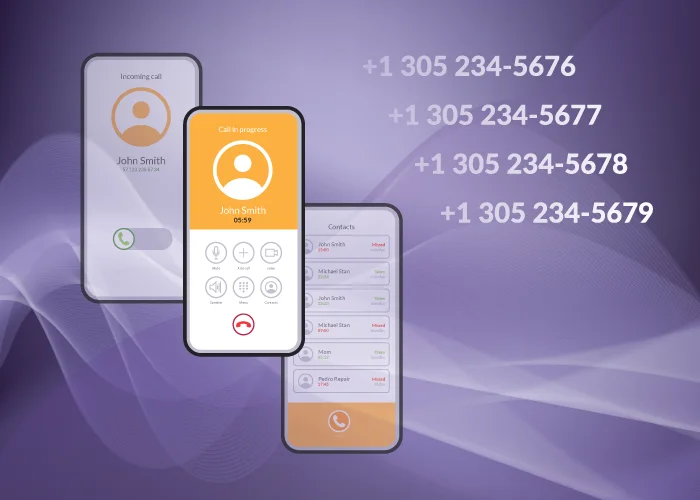
A graphic showing showing consecutive virtual phone numbers listed on mobile devices for global business use.

As global teams scale sales, support, and regional operations, many businesses look for ways to organize their phone systems more efficiently. One solution that often gets overlooked but delivers huge …Read More »

Holiday Season Reporting: Using Call Data to Prepare for Your Busiest Months

Holiday Season Reporting: Using Call Data to Prepare for Your Busiest Months

The holiday season has always been one of the most intense times of the year for global businesses. Between unpredictable call spikes, shifting team schedules, and higher sales activity, the …Read More »

11 Best Help Desk and Customer Support Integrations

Best help desk integrations for global customer support.

When customers reach out with urgent issues, your support team becomes the face of your brand. In those situations, delivering quick, accurate, and personalized support is key. The difference between …Read More »

7 Ways to Prepare Your Business for the Holidays

How to prepare your business for the holidays

The holiday season continues to be one of the busiest (and most profitable!) periods for global businesses. But higher call volumes, shifting schedules, and seasonal customer expectations can put pressure …Read More »

GITEX 2025: Trends & Conversations Shaping MEA Communications

Gitex trends shaping MEA communications

Another incredible year exhibiting at GITEX has just come to a close in Dubai. As a long-time attendee, it was clear this year’s event marked a significant acceleration in the …Read More »

11 Best Help Desk and Customer Support Integrations

When customers reach out with urgent issues, your support team becomes the face of your brand. In those situations, delivering quick, accurate, and personalized support is key.

The difference between a frustrating and a delightful customer experience often comes down to how well your tools work together—ticketing, CRM, chat, and especially voice.

That’s where help desk integrations and customer support systems come in.

With the right help desk integrations, all issues are routed through the appropriate channels, whether it’s email, chat, phone, or CRM, ensuring that every request is tracked, prioritized, and addressed without delay. This unified approach prevents confusion, eliminates duplicate efforts, and keeps your support team focused on resolving customer concerns efficiently.

Choosing the right help desk tool can feel overwhelming, so we’ve handpicked the 11 best help desk integrations that stand out for all the right reasons. Whether you’re just starting up a business or managing large-scale operations, these solutions are designed to deliver better customer service at every level.

We’ll also show how Global Call Forwarding plugs reliable voice and international numbers into your support workflows.

What are Help Desk Integrations?

Help desk integrations are tools that connect your support or help desk software to the rest of your tech stack, such as CRM, telephony, collaboration, analytics, etc. With full visibility into customer history, activity, and engagement across channels, these integrations allow support teams to handle all customer interactions in one place. They minimize inefficiencies and promote quicker, more accurate, and personalized customer service by bringing together multiple tools into a single ecosystem:

  • Who the customer is
  • What they’ve asked before
  • How they’ve interacted across email, chat, phone, and social

A quick note on help desk telephony integrations:

Among these tools, voice communication plays a vital and irreplaceable role in delivering effective customer support. For urgent or complex issues, customers often prefer to speak to a real person. Integrated telephony lets agents answer calls, see caller details, log conversations, and trigger workflows directly alongside your help desk platform.

Voice help desk integrations capture key details such as call duration, agent responsiveness, and sentiment analysis. Teams can seamlessly make and receive calls, sync activity, and log conversations directly within their business platforms, creating an up-to-date knowledge base. To put it briefly, voice-integrated help desk systems turn traditional phone support into an effective, data-driven channel that delivers tangible outcomes.

Example: Global Call Forwarding integrates with leading help desk platforms like Zendesk, Zoho Desk, Intercom, etc., enabling seamless voice calling within support tickets and workflows.
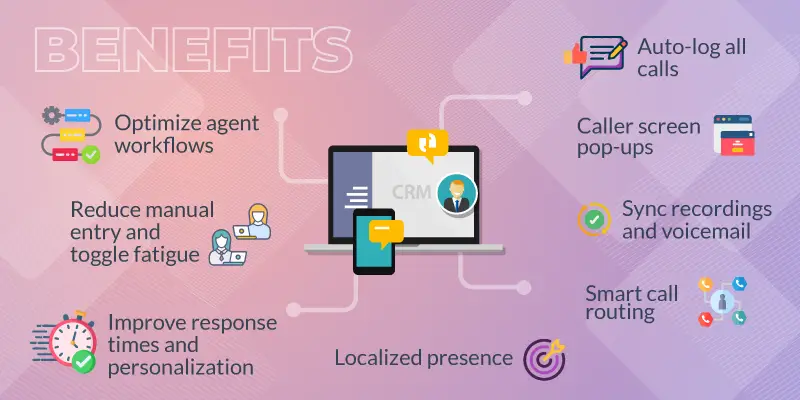
A diagram listing the benefits of a voice integration with help desk software.

Benefits of Customer Support Integrations

Businesses are increasingly adopting integrations to boost productivity and strengthen key customer service metrics. By connecting customer support integrations, companies gain multiple benefits.

Here’s how managers and agents can benefit from these help desk integrations:

  • Optimize agent workflows: Handle tickets, calls, history, and chats from one interface instead of juggling multiple tools.
  • Reduce manual entry and toggle fatigue: Automatically sync data between platforms and eliminate repetitive tasks, improving focus and productivity.
  • Improve response times and personalization: Resolve issues faster and personalize responses with caller data available upfront.
  • Enhance customer history visibility: Access detailed customer records, including past interactions, enabling informed conversations.
  • Auto-log all calls: Log inbound and outbound calls, maintaining a complete interaction history.
  • Caller screen pop-ups: Prepare before answering calls with pop-ups displaying caller information.
  • Sync recordings and voicemail: Connect recordings and voicemails to tickets for follow-ups, quality reviews, escalations, and audits.
  • In-platform call analytics and sentiment tracking: Monitor customer sentiment and call performance directly within existing platforms and use advanced analytics to stay informed without switching tools.
  • Smart call routing: Route calls to agents based on availability, language preferences, and regional knowledge, ensuring customers reach the right department promptly for faster and more accurate resolution.
  • Localized presence: Use local or toll-free numbers tied to each region improves answer rates and customer trust.

Learn more about help desk integrations from Global Call Forwarding.

Features to Look for in Help Desk Integrations

When choosing help desk integrations, the most important capabilities are those that help your team manage every customer interaction from one place, without switching tools or losing context.

Strong telephony integration is essential here. Your agents should be able to make and receive inbound and outbound calls directly inside platforms like Zendesk, Zoho Desk, or Salesforce Service Cloud, with each call data automatically synced. Features like click-to-call and screen pops make this even smoother: agents can dial customers from a ticket in a single click, and incoming calls instantly pull up the customer’s details so the agent is prepared before answering.

Customization and routing flexibility also matter. Your system should allow you to set up IVR menus and routing rules based on skills, language, location, or business hours. This ensures customers reach the right team on the first attempt. You should also have quick access to call analytics and custom reports to understand call traffic and content.

Ticket management and workflow automation are equally valuable. Your help desk should be able to auto-create, assign, and update tickets based on call events, emails, chats, or forms, minimizing manual effort and reducing response times. AI support tools, such as intelligent ticket routing, summaries, and sentiment analysis, help prioritize urgent issues and provide agents with valuable context to personalize their responses.

Collaboration tools like shared inboxes, internal notes, and @mentions keep support teams aligned, while unified data sync ensures every platform (voice, CRM, and help desk) shares the same customer history and call logs. Data synchronization ensures all platforms share unified contact records, call logs, histories, and tickets.

Together, these advanced features create a cohesive, efficient, and high-performing customer support ecosystem.

11 Best Help Desk and Customer Support Integrations

Seamless customer service begins with the right help desk tools. Below are 11 help desk integrations that pair well with integrated telephony and multichannel support. Each fills a slightly different niche: AI-first, SMB-focused, ecommerce, or enterprise.

Software Key Features
1. Zendesk
  • Seamless omnichannel customer support
  • AI-powered automation tools
  • Best-in-class ticketing system
  • Robust security and privacy measures
2. Zoho Desk
  • Effortless multi-channel support
  • An AI-powered assistant with Zia
  • Customer self-help management
  • Automated workflows
  • Enterprise-grade protection and security
  • Auto-tag ticketing system
3. Intercom
  • Advanced reporting and automation
  • Automate replies with Fin AI Copilot
  • Enables proactive customer engagement with outbound messaging
  • Empower agents with an AI inbox—tickets, and calls
  • 24/7 customer support
4. Global Call Forwarding
  • Access virtual phone numbers from 160+ countries
  • Forward calls anywhere, any time
  • IVR menus and advanced routing
  • Record calls for quality assurance
  • Monitor performance with call reports and AI analytics
  • 20+ advanced calling features
  • Softphone apps for flexible calling
  • Get 24/7 global support
5. Help Scout
  • Unified omnichannel support
  • Intelligent AI and automations
  • Robust security and privacy
6. Hiver
  • Seamless omnichannel communication
  • Smart AI and workflow automations
  • Strong security and data privacy
  • Comprehensive service catalog
7. Freshdesk
  • Convert email tickets to instant solutions
  • Automatically resolve queries with AI agents
  • Enhanced agent efficiency with Freddy AI Copilot
  • Communicate effortlessly via chat and voice
8. Re:amaze
  • AI-driven support for instant answers
  • Automate responses and workflows
  • Create a self-service knowledge base
  • Send targeted outbound messages
  • Measure performance and insights
  • Prevent duplicate agent responses
  • Reply faster with pre-written messages
9. HelpCrunch
  • Chat live with customers instantly
  • Access a unified omnichannel inbox
  • Reduce costs using AI tools
  • Automate support with smart chatbots
  • Build a help center easily
  • Speedy, powerful shared inbox for teams
10. HubSpot Service Hub
  • Unified omnichannel support experience
  • AI-powered workflows and automation
  • Enterprise-grade security and privacy
  • Comprehensive and customizable service catalog
  • Get 24/7 support
11. Salesforce Service Cloud
  • Manage support across all channels
  • Track and resolve customer cases
  • Get insights with Einstein AI
  • Centralized searchable knowledge base
  • Automate tasks and workflows
  • Enable customer self-service options
  • Offer live chat sessions
  • Complete customer data visibility


1. Zendesk

Zendesk offers AI-driven service desk software that’s quick to deploy and simple to use, helping you keep costs down. Its flexibility makes it ideal for both IT and customer service applications. This comprehensive customer service platform manages support tickets from multiple channels, including email, live chat, voice, and social media. It utilizes AI-powered workflows to route tickets to the correct agents, suggest responses, and minimize resolution times.

Its strengths include robust automation, macros, and a large marketplace of integrations (including telephony providers like Global Call Forwarding). This makes it a strong choice for organizations that want structured workflows and lots of integration options.

Best for: Mature teams that need omnichannel support and deep workflows.

Related: Zendesk Softphone Integration

2. Zoho Desk

Zoho Desk offers multichannel ticketing across email, phone, chat, social media, and web forms, with native integration to Zoho CRM. Its AI assistant (Zia) helps with classification and suggestions, while automation rules streamline assignment and SLAs. With telephony and messaging integrations, Zoho Desk is a great fit if you already use—or plan to adopt—the Zoho ecosystem.

The platform enables cross-functional collaboration with features like shared ticket views and internal comments. Integrations with Zoho CRM, Slack, Microsoft 365, and telephony systems support a unified workspace, making it easier for support teams to stay aligned across channels.

Best for: Businesses that want tight CRM and help desk alignment.

Related: Zoho Desk Softphone Integration

3. Intercom

Intercom is an AI-powered support solution capable of managing end-to-end frontline customer service with human-like quality. Its Fin AI Agent and AI Copilot help automate common queries and assist agents with suggested replies and context.

Intercom integrates with CRMs, data tools, and telephony platforms, making it ideal for product-led or fast-scaling SaaS companies that want to blend support, messaging, and automation in a single interface.

Best for: AI-first, conversational support teams.

4. Global Call Forwarding

Global Call Forwarding focuses on inbound and outbound voice for international support teams. You can get local, national, and toll-free numbers in 160+ countries, route calls via IVR and advanced routing rules, and support remote or distributed agents through softphone apps and SIP forwarding.

Call recordings, voicemails, and call logs can be integrated into leading help desks and CRMs, so every call becomes part of the customer’s support history.

Best for: Adding global voice and local numbers to your support stack.

5. Help Scout

Help Scout is a customer support platform built for simplicity and cross-functional collaboration (like internal notes and @mentions). It offers a shared inbox where teams can manage customer emails without confusion, along with a knowledge base and live chat for faster self-service and instantaneous support.

Help Scout integrates with tools like Slack, HubSpot, Salesforce, and Shopify, and many other 100+ integrations, enabling seamless access to customer data and boosting workflow efficiency.

Best for: Teams that want a shared inbox with a human touch.

6. Hiver

Hiver turns your Gmail inbox into a fully functional help desk, allowing teams to manage customer queries directly from their email interface. It offers features such as shared inboxes, SLA tracking, email management, and internal notes, enabling clear ownership and faster resolution. Hiver integrates with tools like Asana, Slack, and Zapier to simplify workflows and maintain productivity across platforms.

It’s a good choice for support teams that live in Google Workspace and want structured workflows without adopting a completely new platform.

Best for: Teams that want to turn Gmail into a help desk.

7. Freshdesk

Freshdesk provides a modern, AI-powered help desk with a strong emphasis on automation. It offers a range of tools from ticketing and chatbots to a self-service portal. Its strength is in simplifying complex support operations through intuitive automation and an AI assistant (Freddy AI) that boosts agent productivity.

Freshdesk integrates with popular CRMs, ecommerce platforms, and phone systems, making it a good fit for teams that want to lean into automation while keeping a traditional ticketing model.

Best for: Organizations seeking AI-assisted ticketing and automation.

8. Re:amaze

Re:amaze is built with ecommerce in mind. It enables proactive ecommerce customer support and engagement through automated messaging, workflows, and visitor tracking. It centralizes all communication channels, including email, social media, and live chat, into one dashboard. The platform supports collaboration across support and sales teams with internal notes and shared views.

Re:amaze integrates deeply with Shopify, BigCommerce, and WooCommerce, allowing agents to view order data and take action directly within the chat interface.

Best for: Ecommerce brands needing deep store integrations.

9. HelpCrunch

HelpCrunch is an automation-first customer support platform that combines live chat, email marketing, and a knowledge base. Its unified inbox supports email, chat, and social channels, giving teams a complete view of each customer interaction. The platform includes a no-code chatbot, an AI content editor, and proactive messaging tools to reduce manual workload and improve response speed. It integrates with tools like Zapier, WordPress, Shopify, and Slack to streamline workflows across marketing and support operations.

Best for: Automation-heavy teams combining support and marketing.

10. HubSpot Service Hub

HubSpot Service Hub is a unified customer service platform that offers a 360-degree view of every customer interaction. One of its standout characteristics is its seamless integration with HubSpot’s broader ecosystem, including CRM, marketing, and sales tools. This integration allows support teams to access complete customer histories, communication logs, and behavioral data in one place.

Teams can deliver highly personalized experiences, respond more efficiently, and build stronger customer relationships that improve retention and satisfaction.

Best for: Teams already invested in the HubSpot ecosystem.

11. Salesforce Service Cloud

Salesforce Service Cloud is a strong customer support platform built for enterprises that need scalability, automation, and deep CRM integration. It centralizes case management, automates workflows with Einstein AI, and supports communication across email, phone, chat, and social channels. Service Cloud’s focus areas include intelligent routing, self-service portals, and agent collaboration.

Its native integration with the Salesforce ecosystem provides full access to sales, marketing, and customer data, while third-party integrations with tools like Slack, Zoom, and Jira extend its functionality across departments.

Best for: Enterprise teams that need deep CRM + service alignment.

Unified Support with Global Call Forwarding Help Desk Integrations

Global Call Forwarding enables seamless integration of voice into help desk and customer support platforms by routing calls directly through softphones, SIP, and DID numbers. This allows support agents to manage all interactions within a unified interface. With international phone numbers available in over 160 countries, businesses can offer localized customer service while maintaining centralized control of operations.

With Global Call Forwarding integrations, you can:

  • Get local, national, and toll-free numbers in 160+ countries to offer localized support
  • Route calls using IVR, time-of-day, and skills-based rules to the right team or region
  • Use softphones and web dialers so agents handle calls directly inside CRMs and help desks
  • Automatically log calls, recordings, and voicemails on tickets and customer records
  • Use reporting and AI-powered insights to analyze call volume, performance, and sentiment

Our integrations are designed with flexibility in mind, making it easier to plug reliable voice into tools like Zendesk, HubSpot, Salesforce, and others, without overhauling your core help desk.

Bring Voice Into Your Help Desk Workflow with Global Call Forwarding

Customer service integration adds value when everything works together: data, channels, and teams. Global Call Forwarding makes voice a first-class part of that ecosystem with our help desk integrations for global voice.

  • Offer local support around the world with international phone numbers
  • Use advanced routing, IVR, and call recordings to optimize every call
  • Let agents call and answer from softphones or a web dialer inside your help desk or CRM
  • Capture every interaction (voice, email, chat) in one unified support experience

If you’re ready to bring voice into your help desk workflows, Global Call Forwarding can help you connect telephony to your existing tools, reduce manual effort, and deliver faster, more reliable support.

Talk to our team about help desk integrations or customer support phone solutions, chat with us online!

How to Choose the Best Phone Integration for Zoho CRM

You rely on calls as a salesperson to communicate with potential clients. But without proper tracking, digilent follow-ups and successful outcomes can be tedious. Disorganized call logs might result in inefficiencies and missed sales opportunities.

That’s where Zoho CRM phone integration comes in. With the right softphone integration, your team can place and receive calls directly within Zoho CRM while automatically logging interactions. This improves tracking, collaboration, and efficiency across your sales and support operations.

In this article, we will go over:

What is a Phone Integration for Zoho CRM?

A phone integration for Zoho CRM connects your telephony system with your CRM so your teams can manage calls and customer data from a single interface.

Sales and support teams can place calls using click-to-call, receive inbound calls via softphone, and automatically log call records with notes and outcomes.

This phone integration could be an integration with call center software or a VoIP telephony provider offering a softphone integration.

This centralized communication helps teams deliver faster, more informed service while eliminating manual logging and system switching.

For example, a Global Call Forwarding and Zoho integration would bring advanced global telephony and functionality to the CRM’s platform.

Why Do Businesses Need a High-Quality Zoho CRM Phone Integration?

Integrating your phone system with Zoho CRM helps unify communication and streamline operations across sales and support teams. A high-quality integration ensures every call is tracked, contextualized, and actionable — turning conversations into insights and opportunities.

Here’s why the right Zoho CRM phone integration can make all the difference for growing businesses:

  • Global Reach
    Pair the VoIP integration with international numbers to support customers in different countries while maintaining a local presence.
  • Unified Communications
    Integrating your phone system with Zoho CRM and enabling features like click-to-call allows your team to make calls from the CRM interface. This results in more effective communication, reduced manual dialing errors, and saved time. ​Eliminate toggling between apps and reduce context-switching.
  • Customer Context
    The best phone integration for Zoho allows agents to access interaction history, call recordings, and notes in real time — helping them tailor every conversation, improve customer satisfaction, and foster long-lasting business relationships. ​
  • Scalability
    Integrations with virtual phone number providers can scale with your team as your call volume grows or you expand to new markets.
  • Advanced Call Features
    Depending on your provider, you can even access additional features like voicemail, transcription, and call recording. These features support training and quality assurance initiatives by offering insightful information about client interactions.

Through Zoho phone integrations, Zoho CRM becomes the central communication hub for every customer interaction, ensuring that each conversation promotes a more purposeful and knowledgeable sales process.

How Do Zoho Phone Integrations Work?

Zoho phone integrations work by connecting your cloud telephony provider with your Zoho CRM account through an API or native app, allowing real-time voice communication and activity tracking directly within the CRM.

Here’s how a typical integration functions:

Softphone or Dialer Access: After installing the integration, users see a softphone or dialer within the Zoho CRM interface — usually at the bottom corner. This gives users the ability to make or receive calls without leaving their workflow.

Click-to-Call from Zoho Pages: When viewing a lead or contact, users can click the phone number to initiate a call. This reduces manual entry and improves dialing accuracy.

Inbound & Outbound Call Handling: Incoming calls will trigger a screen pop that shows the caller’s contact record in Zoho (if one exists), allowing the agent to respond with full context.

Automatic Logging & Call Notes: After each call, the integration logs call details like duration, outcome, and time under the contact’s record. Some integrations also allow you to tag the call, leave a note, or categorize it for reporting.

Call Recordings & Transcriptions: If your provider offers it, call recordings and transcriptions can be automatically attached to each contact or deal, making it easier to revisit conversations later.

Reports & Dashboards: You can use Zoho’s reporting tools to track call volume, agent activity, and outcomes — helping managers monitor performance and improve customer engagement.

With Global Call Forwarding, setting up the Zoho integration is straightforward. Once you activate the Zoho softphone integration from your GCF control panel and install the extension from Zoho Marketplace, your team can start making and receiving calls instantly — all while keeping CRM data clean, accurate, and up to date.

Adding international phone number coverage to Zoho CRM

Common Use Cases for Telephony in Zoho CRM

Integrating your phone system with Zoho CRM enables more than just call functionality. It empowers your team to manage the full customer journey through one platform while also supporting cross-team collaboration. Here are a few common ways businesses use telephony within Zoho to streamline communication and drive efficiency.

Inbound Support: Route incoming calls to the right agents and log them in the CRM for better customer context.

Outbound Sales: Use click-to-call for faster prospecting and track outcomes to optimize follow-ups.

Customer Onboarding: Schedule and manage onboarding calls with customer information and interaction history easily available.

Remote Call Handling: Let global and distributed teams handle calls with local numbers and CRM-integrated softphones.

What to Look for in a Zoho Phone Integration?

TL;DR:
The best Zoho phone integrations combine powerful in-CRM features (like click-to-call, softphone access, and call logging) with a flexible, globally connected voice provider. Look for integrations that enhance your team’s productivity, simplify call management, and scale as your business grows — all while keeping your CRM as the central hub for communication.

Choosing the right Zoho phone integration involves more than just connecting a dialer. You’ll want to evaluate both the softphone’s in-CRM functionality and the telephony provider’s network reach, reliability, and voice features.

Let’s dive into these key factors to consider when selecting the best Zoho phone integration:

1. Business Phone Number Coverage

A strong integration starts with a provider that offers the right number coverage for your business needs. Whether you’re looking to establish a local presence in key markets or consolidate support operations globally, your provider should offer local, mobile, or toll-free numbers in your target regions.

With Global Call Forwarding, you can purchase or port phone numbers from 160+ countries and instantly connect them to your Zoho CRM system — enabling inbound call handling and smarter call routing worldwide.

2. Call Management Features

Effective inbound and outbound call handling is essential for productive sales and support teams. With a high-quality Zoho CRM phone integration, your team can access key call management tools directly within the CRM, including:

  • Click-to-call functionality to initiate calls instantly from any contact or lead record, reducing manual errors and saving time.
  • Softphone access is crucial. Choose a provider that offers a softphone integrated directly into Zoho CRM. This lets users handle calls without leaving the CRM interface — improving focus and user experience.
  • Automatic call logging to ensure all inbound and outbound calls are recorded with accurate timestamps, durations, and outcomes — eliminating the need for manual data entry.
  • Call recording and transcription to support quality assurance, compliance, and training. Managers can review conversations and leverage transcriptions to coach teams or track trends across customer interactions.

These features help your team stay organized, manage high-volume sales and support calls, improve productivity, and deliver consistent, high-quality communication.

With Global Call Forwarding’s Zoho softphone integration, you can enjoy these features:

  • Softphone access within Zoho pages
  • Native click-to-call functionality, embedded right into the CRM interface
  • Automatic data synchronization
  • Call logging
  • Voicemail
  • Call recording
  • Call transcription and translation

You can manage and access these features within Zoho CRM pages as well as our control panel.

3. Advanced Call Analytics

The right integration should deliver more than just basic call logs — it should provide deep, actionable insights. Look for tools that track call volume over time or region, call outcomes, responsiveness, etc. Advanced solutions also let you tag phone lines by purpose (sales, support, billing, etc.) and analyze volume across different regions, departments, or customer segments.

Global Call Forwarding offers detailed analytics through its control panel, allowing teams to filter and monitor performance with ease. With AI-powered features, businesses can even analyze sentiment, detect trends, search for keywords, and pinpoint improvement areas — helping teams make smarter decisions, faster.

4. Integration with Existing PBX Systems

Your Zoho phone integration should complement your existing PBX or VoIP setup, not complicate it. Compatibility with your current phone infrastructure ensures a smooth transition and reduces implementation costs.

If you’ve already invested in a business phone system, look for solutions that support SIP forwarding or BYOC to extend global reach while maintaining your current infrastructure. Global Call Forwarding’s flexible architecture makes this easy; chat with our experts to learn more about our solutions.

5. Scalability and Flexibility

As your business grows, your phone integration should grow with it. Choose a provider and integration that can scale with new users, regions, and communication channels. Global Call Forwarding supports every type of business environment from small support teams to large, multi-site sales operations — with 24/7 support and customizable call handling rules to match your evolving needs.

How Global Call Forwarding Integrates with Zoho CRM

Experience a more innovative way to manage calls and drive business growth with our Zoho CRM integration. With our dedicated softphone integration, users can:

  • Make and receive calls from GCF softphone within Zoho CRM
  • Access global connectivity with local & toll-free numbers from 160+ countries
  • Manage inbound calls with advanced routing
  • Improve response rates with outbound calling, Local 2-Way Voice, and local caller IDs
  • Enjoy 20+ advanced call management features
  • Centralize business communication apps
  • Enable sales and support teams to work more efficiently
  • Benefit from reliable 24/7 support to address issues

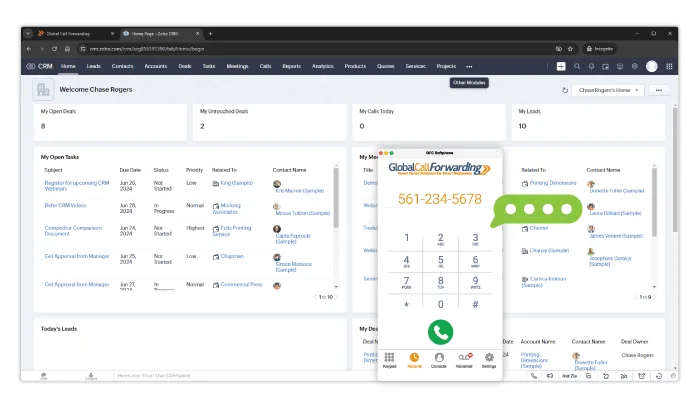
Screenshot of GCF VoIP Softphone within Zoho CRM

Our integration is easy to set up. Simply activate the Zoho integration from your GCF control panel and install our softphone extension from the Zoho Marketplace. You’ll be up and running in minutes.

We also support integrations with helpdesk and ticketing systems like Zendesk, Intercom, and Zoho Desk — making us a strong fit for customer support teams who need voice capabilities across multiple systems.

Integrate Telephony into Your CRM with GCF

Choosing the right phone integration for Zoho CRM depends on your team’s needs, call volume, and global presence. The best solution will centralize your voice and CRM workflows, support growth, and improve customer interactions.

Expand your sales and customer interactions by integrating your telephony system with the best Zoho phone integration. Our Zoho CRM softphone integration gives you the tools to handle global communication more effectively — with local and toll-free numbers, advanced routing, call analytics, and seamless CRM syncing.

Want to learn more about Zoho CRM integrations and our voice solutions? Contact our team — give us a call or chat with us today!


What to Look for in a Help Desk Software (Guide)?

Imagine a customer reaching out with an issue—and without any manual intervention, your help desk software assigns the ticket to the right agent, sends an acknowledgment, and arms your support team with the context needed to resolve it. That’s the power of a modern help desk platform.

What started as basic ticketing systems has evolved into sophisticated, multi-channel platforms that integrate with other business tools like CRMs, phone systems, and analytics dashboards. Help desk software is now the backbone of customer support operations, helping businesses streamline communication, deliver timely support, and improve customer satisfaction.

In this guide, we’ll dive into:

What is Help desk Software?

Help desk software is a centralized system used to manage, track, and resolve customer service inquiries.

It allows support teams to handle tickets across multiple communication channels, prioritize requests, automate workflows, and maintain a high level of service consistency.

Whether you’re a small business or a large enterprise, the right help desk software can simplify support operations, help scale customer service, and improve resolution times.

Importance of Help Desk Software in Customer Service

From small startups to large enterprises, the right help desk software can truly transform how businesses handle global customer support. Businesses can handle complex or heavy workloads without missing a beat, keeping customers satisfied and engaged.

Help desk software plays a critical role in helping businesses:

  • Handle high ticket volumes without delays, especially during peak seasons
  • Assign and prioritize tickets using automation so critical issues are addressed promptly
  • Maintain responsive service levels even during demand surges
  • Ensure 24/7 availability with cloud-based support and routing
  • Manage communication from multiple channels in one interface with multichannel support and integrations

This unified approach provides your support team with a complete view of customer interactions, regardless of where the request came from. For global companies, this feature is particularly valuable as it enables 24/7 customer support across different time zones through cloud-based systems, ensuring that help is always available when needed.

Essential Features of Help Desk Software

When selecting help desk software, businesses should prioritize features that enhance both efficiency and effectiveness in customer service. Look for tools that can handle multiple communication channels, automate workflows, and analyze performance metrics. These capabilities can significantly improve overall service delivery and boost customer satisfaction.

Here are the most important help desk capabilities to consider:

Multichannel Support
Consolidate email, phone calls, live chat, and social media into a unified ticketing system. This gives agents a complete view of all customer interactions and helps ensure no message falls through the cracks.

Automation Tools
Automatically assign tickets to departments, escalate issues based on urgency, and trigger follow-up messages using predefined workflows. AI tools and automation save time, reduce manual errors, and ensure faster resolution.

Ticket Management System
Track the entire lifecycle of a support request—from the first interaction to resolution. Look for features like tagging, status tracking, deadlines, and SLAs that keep teams accountable and organized.

Self-Service Abilities
Empower customers to help themselves with knowledge bases, FAQs, and community forums. This reduces ticket volume and gives users quick access to common answers.

Reports and Analytics
Track agent performance, ticket resolution times, customer satisfaction scores, and communication trends. Reporting tools provide insights to help you improve support operations and customer experience over time.

Integration Capabilities
Your help desk should work with the tools you already use. That includes CRM systems, project management tools, and phone systems. VoIP integrations or softphone integrations are especially useful for customer support teams who rely on voice calls—either inbound or outbound—to resolve issues quickly.

Example: Global Call Forwarding integrates with leading help desk platforms like Zendesk, Zoho Desk, Intercom, etc., enabling seamless voice calling within support tickets and workflows.

Integrating global voice coverage into a helpdesk software

How to Choose a Help Desk Software for Customer Support?

Choosing the right help desk software can be a daunting task. Here’s a step-by-step guide to help navigate this decision:

1. Assess Business Needs

Consider the size of your team, support hours, customer expectations, and volume of inquiries. Are you looking for a simple ticketing tool or an omnichannel platform with global voice support, automation, and analytics? What features and capabilities do you need?

For instance, a small team might only need basic ticket management, while a larger team dealing with high volumes may require multichannel support and customer service automation tools.

2. Look for Customization and Scalability

Choose software that allows for customization and scalability to suit your unique processes. Customizable ticket flows, templates, and permissions allow you to tailor the experience to your team’s needs. Scalable platforms let you add users or features as your support team expands.

3. Consider Integration Capabilities

The best help desk tools integrate with your CRM, email, VoIP, and collaboration tools. Look for platforms that offer:

  • Click-to-call and call logging from within tickets
  • Call recordings and transcriptions accessible to agents via email
  • Screen pop-ups and CRM data during incoming calls
  • Support for international virtual numbers and local caller IDs

Global Call Forwarding offers softphone integrations to enhance your help desk by embedding international voice capabilities directly into your support system—without the need for new hardware or multiple providers. Whether you work with Zendesk, Zoho Desk, Intercom, or other help desk software, we can get you set up with global coverage and advanced features.

4. Review Security and Customer Support

Security should be a top priority, especially when handling sensitive customer data. Make sure the help desk software has strong encryption, secure access controls, and complies with data protection regulations. Additionally, check the quality of the provider’s customer support. Whether it’s setting up or troubleshooting the system, timely assistance is crucial to avoid downtime that can affect customer service.

5. Test and Decide

Before fully committing to any platform, take advantage of free trials or demos to see how well the software works in real-world scenarios. Evaluate the UI, agent experience, reporting functionality, and how well it integrates with your existing stack. Involve both agents and admins to assess usability and configuration flexibility.

Related: Best Help Desk and Customer Support Integrations

How Can Global Call Forwarding Help?

Besides helping manage customer interactions efficiently, help desk software streamlines internal communication, automates workflows, and ensures queries are addressed properly.

Support teams today need more than just ticketing—they need reliable global communication tools and phone systems designed for customer service. Integrating with VoIP services further enhances the software’s capabilities. That’s where Global Call Forwarding comes in.

We offer:

  • Help desk integrations with platforms like Zoho Desk, Intercom, and others
  • International virtual phone numbers in 160+ countries to create local support lines
  • Advanced call routing, IVR menus, and time-based rules to direct inquiries to the right agents
  • Cloud-based softphones for handling calls anywhere
  • Click-to-call, call history, and data sync inside your support platform

Whether you’re scaling support internationally or optimizing internal workflows, GCF helps your help desk system do more with integrated telephony.

Learn more about our help desk integrations or speak with our experts to see how we can support your team.

6 Ways to Use the GCF Softphone in the HubSpot CRM

The Global Call Forwarding HubSpot integration gives your sales and support teams the tools they need to communicate effectively — right from within your CRM.

With features like click-to-call, automatic logging, and built-in softphone access, this integration helps streamline workflows, centralize data, and improve customer interactions without switching between apps.

Whether you’re managing global outreach, inbound support, or client follow-ups, here’s how to make the most of your GCF Softphone inside HubSpot.

How Does the HubSpot-GCF Integration Work

The GCF-Hubspot Calling integration connects your Global Call Forwarding softphone to HubSpot CRM, allowing your team to use GCF’s global voice features directly within their CRM workflow.

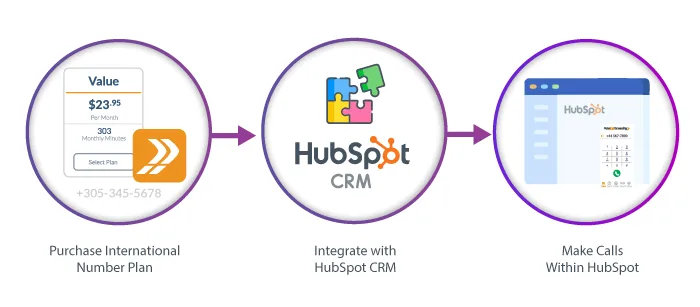
Chart showing how to use the HubSpot Calling Integration with the GCF Softphone.

Once integrated, you can make and receive calls using GCF numbers, access customer details, log call activity automatically, and manage conversations without leaving HubSpot. Calls are routed through the GCF softphone, which supports features like caller ID and call recording, giving teams a unified system for communication and customer engagement.

The result: better productivity, improved call accuracy, and a more streamlined support and sales process.

Benefits of a VoIP-CRM Integration

Integrating your VoIP phone system with your CRM centralizes communication and customer data in one platform—streamlining workflows and increasing productivity.

With VoIP-CRM integrations, teams can make and receive calls directly within the CRM using click-to-call, while incoming calls trigger softphone pops with relevant customer information easily available through the HubSpot platform.

Call activity, recordings, and notes are automatically logged, eliminating manual data entry and ensuring a complete view of each customer touchpoint. This integration helps sales and support teams save time, improve response accuracy, and deliver better service at scale.

How to Use the GCF Softphone with HubSpot

Connect Global Call Forwarding with HubSpot to streamline calling, boost productivity, and improve customer engagement—all within your CRM. With this integration, your teams can:

  • Click to call directly from contact records
  • Use local/global numbers across 160+ countries
  • Centralize communication and call history in one place
  • Automatically log, record, and transcribe every call
  • Analyze call performance and trends via advanced analytics
  • Manage caller ID and number display per region
  • Route calls smartly with IVR and forwarding rules
  • Track sales/support activity across global teams

Whether you’re in sales, support, or operations, this integration helps your team work smarter and deliver better results. Let’s see how:

1. Make and Receive Calls with Click-to-Call

No more copy-pasting numbers or dialing errors. With click-to-call functionality, your team can place outbound calls directly from any HubSpot contact record. One click initiates the call via the GCF Softphone, speeding up outreach and minimizing effort. This saves time and increases workflow efficiency by allowing you to start outgoing calls with a single click on the customer’s phone number.

Incoming calls trigger a softphone pop-up, enabling reps to answer quickly and stay focused on the task at hand.

2. Expand Global Coverage

For global teams and international customer bases, the GCF-HubSpot integration offers a powerful way to scale communication. Global Call Forwarding provides access to virtual phone numbers in 160+ countries, which can be easily integrated into your HubSpot CRM.

This means your teams can make and receive calls using local or toll-free numbers from anywhere—directly within HubSpot. Expanding coverage in key markets boosts pickup rates, builds local trust, and allows you to support customers in-region without needing a physical office.

Learn about the GCF Softphone calling integration for Hubspot CRM

3. Centralize All Communication in One Place

By integrating VoIP calling straight into the HubSpot CRM, you unify business communication in one place. Our HubSpot Calling integration lets you make and receive calls, access contact history, and log call activity — all from within your CRM. This streamlines daily workflows and keeps your team focused on meaningful interactions. Centralization makes it easier for sales and support teams to collaborate, track progress, and deliver better outcomes.

4. Automatically Log, Record, and Transcribe Calls

Every inbound and outbound call made through the GCF softphone is automatically logged within HubSpot. This includes call time, duration, call notes, and recordings. Agents no longer need to manually enter notes or update call histories—saving valuable time and improving data accuracy across sales and support workflows. This ensures complete visibility into the customer journey, helping managers and teams make better decisions.

With advanced features like call recording, transcription, and translation, teams gain more than just a phone connection—they get a record of every conversation. Recordings can be used for training, coaching, or compliance. Transcriptions provide searchable, text-based documentation of calls. And with translation, teams can convert transcriptions into other languages, making it easier to support multilingual customers and global operations while maintaining consistency across teams.

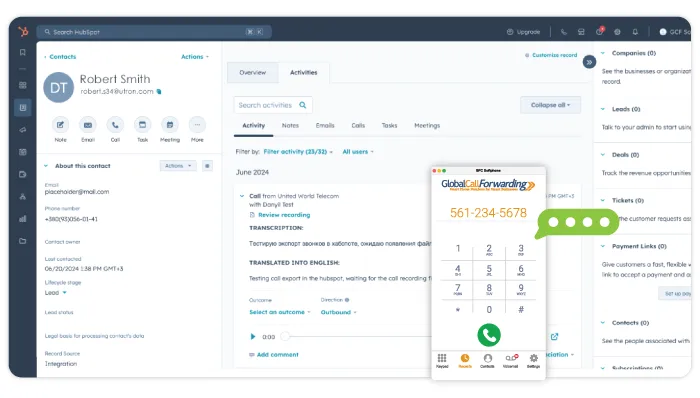
GCF Softphone within a HubSpot CRM dashboard.

5. Analyze Call Metrics for Better Performance

The GCF softphone integration unlocks access to detailed call analytics and custom reports accessible from your Global Call Forwarding dashboard. Track call volume by rep, team, region, or campaign. Use phone tags to identify trends and organize call data.

Monitor missed calls and response times, listen to voicemails and recordings, and more. You can even leverage AI-driven insights like sentiment analysis and keyword search to better understand customer needs and optimize training and performance.

6. Manage Caller ID and Global Numbers

Choose which business number to display when placing outbound calls from HubSpot—whether it’s a local number in your target market or a national number. With Global Call Forwarding, teams can easily manage and use numbers assigned to different countries and regions, enabling them to maintain a local presence while working remotely. Displaying a recognizable caller ID increases answer rates and reinforces your company’s credibility.

These settings can be easily managed from the GCF softphone.

7. Route Calls Intelligently with IVR Integration

Pairing IVR with HubSpot allows businesses to intelligently route calls based on caller input, location, time of day, or department selection. Set up routing and forwarding rules in the Global Call Forwarding control panel and apply them to the corresponding HubSpot phone lines, giving full visibility into each interaction.

Whether a caller presses 1 for sales or 2 for support, the integration ensures a seamless customer journey—and your team knows exactly how the customer was routed and why.

8. Monitor Multi-Location or Global Sales Activity

With our expansive international number coverage and HubSpot’s CRM capabilities, managers can track call volume, success rates, and responsiveness across global sales or support teams. Break down metrics by country, department, or time zone to evaluate performance, staffing needs, and regional campaign effectiveness.

This level of visibility helps you make data-driven decisions to scale efficiently and ensure consistent customer experiences—no matter where your teams or customers are located.

Get Started with the GCF-HubSpot Calling Integration

The GCF-HubSpot Calling integration is designed to simplify your team’s communication workflows while helping you scale globally. From advanced routing to data-rich analytics and AI insights, this integration provides the tools to improve every customer interaction.

Need global phone numbers, reliable call quality, or deeper reporting? Global Call Forwarding supports 160+ countries with advanced features to power your sales and support operations — all from the CRM you already use.

See how easy it is to set up our softphone integration with HubSpot.

Call our telecom professionals at (561) 908-6171 or speak with them online to learn more about our integrations! Implement the GCF Softphone in the HubSpot CRM integration to take your business communication and CRM to the next level!