It is easy to get lost in a growing sea of IVR number providers. While there are many out there, the good quality and easy-to-use ones are still rare. You want an IVR provider who offers you a quality product with responsive support.
Choosing the Right IVR Number Provider
Your IVR provider will determine how callers interact with your business phone system. An efficient automated system will cut down on wait times and assist callers without frustration or confusion. The right IVR number provider will help your business:
Here we list the top 6 IVR number providers with information about features and pricing so that you can make an informed decision:
Global Call Forwarding
Twilio
Nextiva
RingCentral
Five9
8×8
*Note: Costs mentioned in this article are current at the time of publishing and may be subject to changes.
1. Global Call Forwarding
Global Call Forwarding offers a fully customizable, no-code cloud IVR system along with their virtual phone number plan. You can use their IVR manager within the control panel to set up simple to complex call flows. They offer tutorials and support materials during the onboarding process to help acquaint your team with the manager.
Global Call Forwarding IVR cost:
Global Call Forwarding offers cloud IVR for free with a virtual phone number plan. So, the cost of IVR is the price of a business phone number. For example, US numbers start at 7.95/month with access to our full IVR manager.
2. Twilio
Twilio is a cloud contact center that provides advanced and customizable business phone solutions from voice to video. They offer IVR and other voice features along with their programmable voice service. You can create IVR workflows within their IVR studio; no coding required.
Twilio IVR cost:
The price of their IVR system is the price of their voice service. They offer three different pricing options: Pay-as-you-go, volume discounts, and committed-discounts, which are based on the type of call or amount of minutes you will use. For example, local calls with the pay-as-you-go pricing start at $0.0130/ minute.
3. Nextiva
Nextiva offers voice and call center software to businesses of all sizes and industries. You will need an account with them to use their call flow builder to design your IVR system. They also use natural language processing (NLP) to bring conversational AI to your IVR system.
Nextiva IVR cost:
Nextiva offers advanced IVR (auto-attendant) with a Nextiva VoIP service. Their voice solutions start at $17.95 /user/month.
Source: Stockphoto.com O#1202 – ID#100150145640
4. RingCentral
Like others listed in this article, RingCentral also offers IVR and auto-attendant services within their voice phone service plans. You can use their Visual IVR Editor along with other features from their dashboard.
RingCentral IVR cost:
RingCentral offers multi-level auto-attendant and multi-level IVR is a premium feature within their Message, Video, and Phone (MVP) package. Their plans with auto-attendant (and other features) start at $30.39/user/month.
5. Five9
Five9 offers IVR as part of their inbound contact center solution. This solution brings you various business phone service features from IVR to advanced routing and more. Their IVR service comes with omnichannel routing and screen pop.
Five9 IVR cost:
Five9 has three different pricing models: Monthly On-Demand, Per-Minute Fees, and Annual Contracts. You will need to contact their sales team to get a quote for their service.
6. 8×8
8×8 offers a basic IVR solution that lets users create menus and self-service options. Like others mentioned above, these are designed for users to use on their own, without the need for code or expert support. They also feature a visual editor to help users map out their IVR paths.
8×8 IVR cost:
8×8 offers IVR within any of their X series plans, which start at $12/user/month.
Global Call Forwarding: An IVR Number Provider
Part of reviewing different IVR number providers is reaching out to them and understanding what your business communication system would look like with their service. To learn more about the advanced IVR solution offered by Global Call Forwarding, speak with our experts today! Call us at +1 (561) 908-6171 or chat with us online.
Tired of dropped calls and bad call quality? Need to get out of a long-term phone service contract? Want to add more call management features to your phone system? One way to upgrade your business phone system is to port your number to a VoIP service provider.
In short, VoIP number porting is the process of switching phone service providers while keeping the same number. No more worrying about updating everyone with your new phone number or staying stuck in contracts with low-quality service.
Here’s an in-depth guide to VoIP number porting with a focus on the process, requirements, and benefits of porting your number to a new phone service provider. We will also discuss how you can port a toll free number to a new VoIP service.
Porting Your Number In & Out of a VoIP System
Porting your 800 number to a new VoIP phone service is a simple and quick process. Whether you need a new service for business or personal use, number porting can help you switch to a new provider and improve your phone service’s reliability and efficiency. In this VoIP number porting guide, we will go over:
VoIP number porting is a telephony solution that lets users or owners of a number move or port their number from an old service to a new service. This means that you can switch phone service providers while still keeping your phone number intact.
How Does Number Porting Work with VoIP Numbers?
To port your phone number from one service to another, you first need to reach out to your new VoIP service provider. Most VoIP providers offer VoIP number porting and will ask you to fill in a porting request. Then, your new and old providers work together to ensure porting without any service interruptions.
It is important to wait for a successful transition to your new service provider before canceling your old service (ending your existing contract).
Benefits of Porting Your Number to VoIP
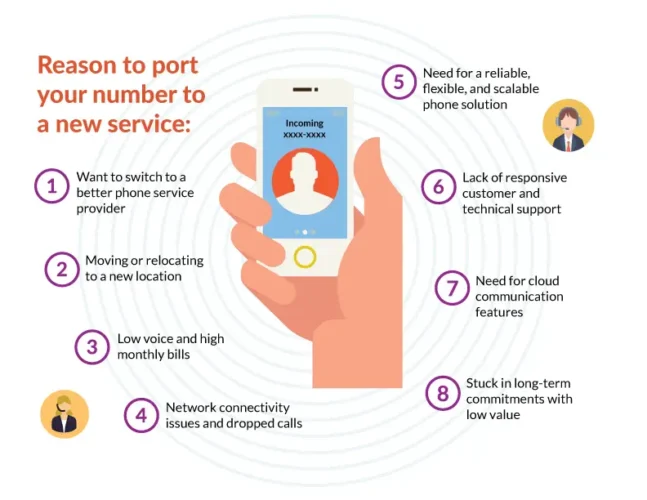
For many customers, VoIP and toll free number porting allows them to get out of long-term contracts and find better phone service providers. Here’s an opportunity to improve your business phone system, add call management features, and make your phone system more efficient and reliable.
So, why and when should you port your 800 number to VoIP?
Here are some benefits of number porting and situations where you may need to switch to a new service provider:
Moving or relocating to a new city or region
Low voice and audio quality
High monthly bills
Network connectivity issues leading to a high number of dropped calls
Stuck in any of these situations? Your business phone system needs to function well and reliably so that your teams can offer uninterrupted service and support to your customers. It may be time to walk away from a service that costs a lot but does very little.
How Long Does it Take to Port a Number?
VoIP number porting is a simple process that takes about 2–4 weeks to complete. Your new VoIP phone provider will keep you posted on the next steps and give you a timeline.
While your number is being ported, you will still maintain access to your phones and phone service. This means inbound and outbound calls won’t be interrupted.
Note that porting international VoIP numbers may take slightly longer but still should not interrupt your service.
VoIP Number Porting Requirements
There is a bit of a process involved with number porting to ensure everything works effectively. When submitting your porting request, you will also need to provide the following information to your new VoIP phone service provider:
A list of all your phone numbers – Includes all phone numbers and extensions in use and that you would like to port over.
Letter of Authorization (LOA) – Gives your new VoIP provider permission to act on your behalf when communicating with your old provider. A LOA usually contains crucial information about who can make decisions about your number(s) listed above.
Old service provider and account number – To let the two providers communicate and work together to complete the process.
Copy of current phone bill – Includes necessary information (name and address registered with the current provider) about your existing phone plan and offers the new provider additional proof of number ownership.
Here’s a number porting checklist offered by the Federal Communications Commission (FCC) to help you further understand and prepare for the process.
VoIP Number Porting Rules
Before you begin the porting process, it is good to familiarize yourself with porting rules followed by most VoIP providers. According to the FCC rules, carriers and providers:
Must port a number upon receiving a valid request.
May not refuse to port a number.
Can charge for porting services.
Can charge an early termination fee, especially for long-term customers.
May refuse to port if the customer has not paid for porting.
How to Port Your Toll Free Number to VoIP?
Once you have identified your provider and are ready to port your number to VoIP, you and your new provider can begin porting the number to your new service.
Here’s a brief overview of the number porting process:
You submit a porting request to your new VoIP service provider with the requirements and documentation.
The new provider reaches out to the old service provider.
The old service provider confirms the user’s identity and notifies the new provider.
The new provider notifies the Number Portability Administration Center (NPAC).
NPAC creates a pending port and notifies the old provider to concur.
The new provider asks NPAC to activate the port.
Upon activation, the port is broadcasted to the telecom industry network.
Your new service will be activated.
Potential Issues with Number Porting
Here are some instances where number porting may be declined or may take longer to complete.
1. Number isn’t portable
Even though the FCC requires that numbers be portable, there are a few issues that may interrupt the process:
The number is no longer in service — If your phone number isn’t in service or the service was terminated, the new provider cannot port it.
Incomplete rate center / no coverage — Your new VoIP provider doesn’t have coverage in your area; therefore, they cannot port numbers there now.
No interconnect agreement — Your new VoIP provider must have an agreement with the old carrier that holds the phone number.
These issues are hard to resolve and usually mean that you need to find an alternative to porting. Speak with your VoIP provider to find a solution that fits your needs.
2. Other issues and errors
These issues are fixable but may delay the porting process:
Incorrect name and address — Contact information provided is incorrect, making it harder to prove ownership of the number.
Phone number was not found — Might occur due to user error when inputting the phone number (i.e., phone number entered incorrectly).
Porting a toll-free number — Toll-free numbers take a longer time to port.
Limited porting options — Porting numbers is easier in some countries over others. Check geographical limitations with your local provider before porting.
These issues are relatively minor and can be resolved; porting is not impossible here but might take a little longer.
To port your number to Global Call Forwarding, simply fill and submit this porting request form. Our representatives will get in touch with you to start the process as soon as possible. To learn more, speak with our representatives today. Call us at +1 (561) 908-6171 or chat with us online!
With the wide adoption of cloud computing and technology, companies have enjoyed greater versatility and efficiency by incorporating the cloud into their functionality.
What is cloud telephony? Cloud telephony is a cloud-based phone system that works through your internet connection.
It is a type of unified communications as a service UCaaS that brings all your business communication needs in one place. It lets businesses move their phone service to the cloud with the help of cloud PBX to make the process seamless while providing high-quality voice service.
Other names for cloud telephony include cloud calling, cloud communications, and cloud phone systems. A cloud telephony system consists of:
VoIP phone service — to transmit calls with high quality
Cloud or virtual phone numbers — from various countries globally
Softphones — to convert any device into a business phone
Outbound calling — to make outgoing calls with specific caller IDs
When you choose cloud telephony for your business, you can say goodbye to poor call quality and latency issues, as well as logistical problems such as long-distance fees, service network blockages, network restrictions, and more.
Cloud telephony uses VoIP to transmit calls via the internet. It is not attached to one specific location, making it easy for users to make and receive calls from any location and through any device. By doing so, your business can expand beyond its immediate geographic boundaries and enter new markets cost-effectively.
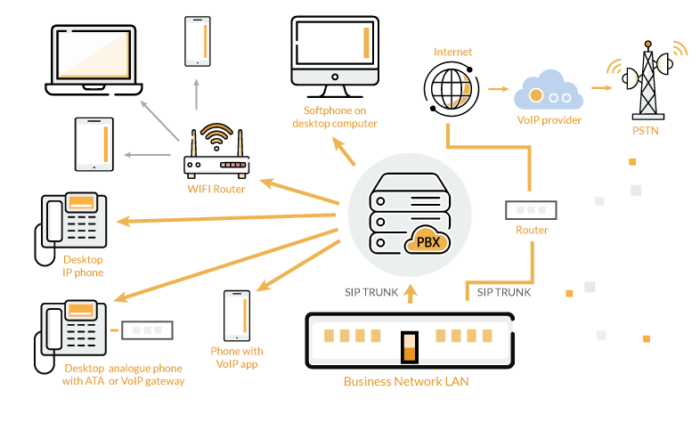
But what does this look like within your business? You can integrate cloud telephony within your existing system. This means you do not have to purchase new equipment or hardware. In fact, you can even use a softphone on your computer or tablet instead of using desk phones.
The best part about using a cloud phone system is that you can control the service from any location through an online control panel. Here, you will have access to all features and full control over your phone numbers. You can add new numbers or users, make changes, add new rules, and more.
Example of Using Cloud Communications for Business
Suppose you run a business located in the US but want to expand your operations to Singapore. Traditionally, you would decide to set up a local office in Singapore. This could take weeks of preparation: filling out paperwork, hiring local agents to handle licensing and legal matters, investing capital in the country, leasing property, hiring staff, and more.
Alternatively, you can buy Singapore virtual phone numbers with an outbound calling service. This lets you call local customers and businesses with a local caller ID, even when calling from the US. And when you are ready to set up a local office, you can easily expand your cloud telephony system to cover the Singapore office as well. Or, you can operate solely on digital channels.
Benefits of Using a Cloud Telephony Service
What is cloud-based telephony used for? Different types of businesses—SMBs, startups, large enterprises, and individuals —benefit from when using cloud telephony for their business phone service:
Here are 5 reasons why your business should get a cloud telephony service:
Quick and Easy Implementation
Taking Your Business to the Cloud
Expand Globally in a Cost-Effective Way
Access to Advanced Call Management Features
Flexibility for Your Business
1. Quick and Easy Implementation
Since cloud phone systems don’t need additional on-site hardware, you can get it running pretty quickly without technical support or installation. Your cloud telephony provider will take care of most of the implementation, leaving your employees to continue working without any downtime.
2. Taking Your Business to the Cloud
We’ve seen a rise in cloud-based apps and software such as project management systems, HR software, headless CMS, CRMs, phone service, and more. These apps and solutions let us conduct business from any location and device—a boon during the pandemic as most people had to quickly switch to working from home.
And so, your business will miss out if it does not adopt cloud-based business solutions. It is also important to note that cloud-based solutions are often more reliable and secure, making them a good fit for businesses.
3. Expand Globally in a Cost-Effective Way
Cloud communications allow your small-to-medium-sized business to grow globally. You do not have to be physically present in a country to sell products and offer customer service. Simply buy a local or toll free number for that country specifically and route calls to your office located elsewhere. You can do the same with other countries and regions within your expansion plan. Scale your business at your own pace with flexible and advanced phone solutions.
4. Access to Advanced Call Management Features
What makes a cloud communication system worth it is the array of features, services, and add-ons you get to use. Different providers will offer you different feature sets. When choosing a provider, it helps to determine what you need from your cloud telephony system.
For instance: Do you need to automate call routing? Do you need to record all or some calls for customer research purposes? Do you need to override your caller ID when calling internationally?
Here are the top features and services you can get:
Cloud phone numbers (local and toll free numbers)
International call forwarding
Cloud IVR
Advanced call routing (follow the sun routing and geo-routing)
Outbound calling
Cloud contact center solutions
SIP trunking
Call recording
Call masking
View a list of features offered by Global Call Forwarding.
5. Flexibility for Your Business
Switching to the cloud opens up a lot of avenues for a business. Traditionally, entering a new market meant opening a brick-and-mortar store or local office. However, depending on your business model, you might find it cost-effective to run everything virtually. That is, instead of developing a physical presence, you can manage operations from your headquarters, located in another country. And cloud telephony makes it possible to do this.
You can sell your products and services online and ship them internationally. And for customer service, you can direct calls from this new market to your headquarters or a remote agent. This reduces the need to create an expensive and resource-intensive branch office to interact with customers.
Source: Stockphoto.com O#23559 ID#100033099327
How to Choose a Cloud Telephony Provider?
Choosing a global telephony provider for your business’ cloud communications can be tricky. There are many providers out there claiming to offer high-quality service for low rates. But you need to find one that you can rely on and works within your budget.
Here are 7 tips to consider when choosing a cloud telephony provider:
Proven Reliability and Reputation
Service Quality and Certifications
Cost of the Service
Features and Integrations
Contract Lock-In and Migration Support
Customer Support and Account Management
Customer Reviews and Testimonials
1. Proven Reliability and Reputation
The first thing you want to know about your provider is their reliability. Consider these:
How long have they been doing business?
What are customers saying about their service?
What certifications and awards do they have?
Are their employees experts in the industry?
Do they have a proven track record of providing high-quality service?
Dig deep with your research and compare providers to see which one is more reliable.
2. Service Quality and Certifications
High uptime, low downtime, and excellent voice quality are required for any successful cloud phone system. Your cloud phone service provider should provide redundancy and failover forwarding so that you can maintain business continuity, even during a crisis.
Also, look closely at their service level agreement (SLA). This should outline their service objectives, exceptions and exclusions, remediation policies, and so on. To get the most out of your service, you want to choose a provider that promises 99.99% uptime with multiple layers of redundancy.
You may also want to look at their security and industry compliance. Ideally, your new provider will have some of these certifications in place:
HIPAA Compliance: For healthcare service providers.
ISO/IEC 20071: Global standard for security threat responses.
SOC 2 Compliance: Incident response plans to protect privacy and data.
Transport Layer Security (TLS) and Secure Real-time Transport Protocol (SRTP): Enterprise-grade security in every call.
3. Cost of the Service
Next, you want to understand what your service entails and what is included in your bill. In other words, what exactly are you paying for? You want to pick a provider who has transparent pricing with no hidden fees. Look for pricing specifics like:
Type of pricing: Per month / per user per month / per line per month
Number of users on the plan
Monthly vs annual pricing and discounts
Technology and equipment requirements
Flexibility and scalability: Is it easy to change or adjust your plan?
Costs for inbound and outbound calls: For different number types
Additional per minute rate
Cost of additional features, add-ons, and integrations
Other fees: installation or setup fees, mandatory taxes, service fees, cancellation fees, etc.
We offer full transparency on our pricing page, so you know what is and isn’t included in your phone service plan.
4. Features and Integrations
The main reason for choosing a new provider is to have a better business communication system. And so, it is essential that this new provider offers your features and add-ons that help you achieve your goals. Review their features and integrations to see if they make a good fit for your needs.
5. Contract Lock-In and Migration Support
If, for whatever reason, this provider does not satisfy your needs, you do not want to be locked into a long-term contract and struggle to cancel or face any complications when migrating to cloud communications. Review the contract carefully for lock-in clauses and the cancellation policy.
6. Customer Reviews and Testimonials
Customer testimonials and reviews are a great place to gauge how customers like you use this provider’s service and what, if any, problems exist. You can also see how the provider responds to bad reviews and what they do to resolve an issue.
Want to know how our customers use our service? Check out our customer testimonials.
Customer Support and Account Management
Since your phone service is crucial to the successful running of your business, you should be able to get assistance quickly, in case something goes wrong. So, you need to evaluate your provider’s customer support:
Is it fast and responsive?
Do they offer 24/7 support?
Are they available on live chat, email, call?
Do they respond to support tickets within 24 hours?
Will you have a dedicated account manager to manage your account?
You can test their customer support during the free trial process or ask about what options they offer beforehand.
Switch to Cloud Telephony with Global Call Forwarding
As you can see, cloud telephony is the future of business communication as remote working becomes more common and companies are looking to expand globally. With a cloud phone system, you can expand and scale while keeping costs low and managing your teams through one central system.
Want to know more about the cloud telephony solution offered at Global Call Forwarding? Book a demo today or chat with our representatives online!
Growing a business means upgrading your systems and tech to use more efficient solutions that will help your employees do their job better.
Upgrading your business communications, in that vein, means improving the way your business communicates internally and externally. This means gaining high-quality voice, reducing downtime, and maintaining business continuity. A transition to cloud communications can ensure your phone system functions efficiently and continuously without interruption, no matter where your teams are.
Here is an in-depth guide on migrating to cloud communications, focusing on:
The main reason to upgrade your legacy phone system is access to better and more secure services. But that aside, there are many reasons to transition to cloud communications—from wanting to revamp its business phone system to bringing on new features and services. You can get:
Access to advanced features and services
More reports and data
Better cloud security
Flexibility and scalability
Increased collaboration and productivity
Improved business continuity and disaster recovery
But why your business should consider cloud communications depends on what you want to achieve with a cloud phone system.
Do you want more reliable service?
Do you want to expand globally in a cost-effective way?
Are you looking to scale your customer support and sales reach?
Do you want to manage local, global, and remote teams through one centralized communications platform?
A transition to cloud communications can help you do these and more. Here are the top benefits you get when you migrate to cloud communications:
High-quality voice service with multiple layers of redundancy and low downtime
Access to new and advanced call management features
Ability to work from any location and device
Support for local, global, and remote teams
Reduced risks and improved business continuity across different locations
Ability to scale your business globally with cloud phone numbers.
What to Avoid During a Cloud Communication Migration?
Even as you prepare for the switch, you may miss out on some key aspects that can impede the success of your new communication system.
Thankfully, you can avoid and resolve these issues by communicating with your employees and cloud phone service provider. An experienced cloud phone service provider can help you avoid these issues and transition smoothly.
When you decide to adopt cloud communications, you need to pay attention to 3 key elements:
1. Technology
Your phone system technology and equipment must be aligned and prepared for the transition. It is, therefore, important to review what you currently have and if you need anything else.
Tools and features — Which services and features are being used, why, and by whom? How do your teams communicate internally and externally? What valuable tools and features are missing in your existing phone solution? What business processes can benefit from new communication features?
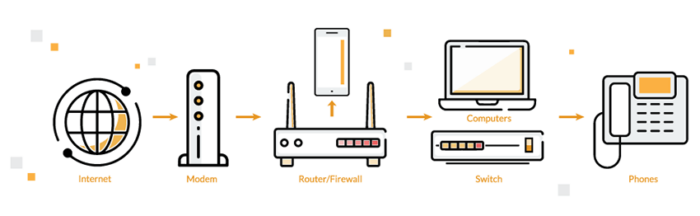
Network — Can your existing phone network and internet service handle the increased demand of the new provider and service? Do you need a new provider who can support your plans to scale your business? What changes do you need to make to improve security, such as switching your router or firewall?
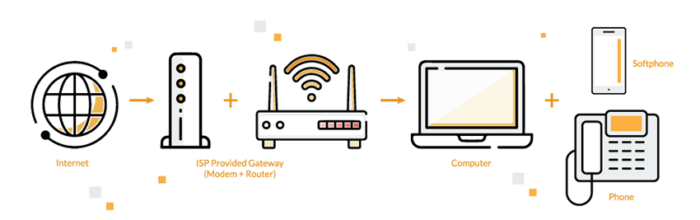
Equipment — Can existing equipment and hardware be reused, or do you need to replace them with new hardware? Does your cloud telephony provider a service that can be integrated within your existing network? For example, using a softphone for placing business calls through the computer.
2. Processes
This part of the process focused on understanding what your ideal business communication process looks like and identifying gaps to fill.
Map Out Existing Communication Processes — How does your business communicate internally? How do your local, global, and remote teams share information and collaborate? What are some ways to improve this type of communication? How do you handle customer-related inbound and outbound calls? What disaster recovery and redundancy plans do you have in place or need to have?
How to Improve These Processes — How can new features support your business communication goals and processes? What new features and additional services do you need (instant messaging, live chat, advanced routing, etc.)? How can you use cloud telephony to expand globally and improve call management?
3. People
Part of preparing your business for a transition to cloud communications is to get everyone on board, including employees, suppliers, customers, prospects, stakeholders.
First, you need to understand how your staff uses the existing communication system and what they need from the new phone system. Their feedback is crucial in the successful adoption of the new system.
Once the migration process begins, everyone will need formal training to move the process along smoothly. Everyone who uses the new system will need the training to understand how the new system and features work. Your provider should provide such onboarding training and support. It’s a good idea to create guides and knowledge bases that everyone can access for information.
If there are any changes to workflow and processes (such as flexible working options or new customer support centers), make sure to communicate these effectively with policies in place.
How to Transition to Cloud Communications Successfully
By preparation for your transition to the cloud, you can:
Migrate with little disruption and low downtime
Implement a solution tailored and customized to your business’ requirements
Improve your workflows and processes
Provide training and support for staff, stakeholders, and customers.
Here are the 6 steps to a smooth and successful cloud communication migration:
Step 1: Visualize End Goals
First, you need to determine what you want your new business phone system to do and how much you want to spend on it. Then, you can start to look for the right provider with relevant features and a compatible service plan.
Step 2: Review the Current Situation
Next, audit your current system. What assets, capabilities, and processes are working well? What is essential to your business and teams? Get feedback from employees and others using your phone system.
Step 3: Identify Improvement Opportunities
When doing your review, identify what is lacking in your current system. Different cloud phone service providers offer different tools, features, and add-ons, but not all may be necessary for your needs. So, it is crucial to know what you need from your provider to make your business run smoothly and efficiently.
Step 4: Find the Right Cloud Phone Service Provider
Once you identify what you need, you can look for the right provider and cloud communication solution. Compare top providers, review plans and pricing, look at customer reviews and testimonials. You also want to understand the onboarding process and migration support so that you can transition smoothly without any interruptions or downtime.
Step 5: Prepare your Business
Then, you need to get everyone on the same page with training and onboarding. This change will impact different sections of your business: staff, customers, vendors, and suppliers. So, they need to prepare as well.
Step 6: Assess Network and Test
As you transition to the new cloud communication system, you want to test and make sure everything is running efficiently on your network. Your provider can help with configuration and testing.
Cloud Communications Transition with Global Call Forwarding
Migrating to the cloud is a big step, but one in the right direction. It can elevate the way your business communicates with customers and partners, and it can support your expansion plans and establish your business as a credible and reliable one.
Global Call Forwarding can help you build a cloud communication system that works for your business. We offer a wide range of call management tools and additional services so that you can focus more on your business and customers instead of your phone system.
Speak with our experts to learn more. Call us today at 1-888-908-6171 or chat with us online.
Are you looking to improve caller experience when customers contact your business? Responsive phone support is crucial to increasing caller satisfaction.
And one way to make your business reachable and responsive is with call routing. Try different advanced call center routing strategies to reduce wait times and help callers reach the right department or employee quickly.
Call routing is a call management tool that distributes incoming calls based on rules set by your business. In other words, you can set rules to route incoming calls to specific employees, offices, departments, or phone lines, as needed. This can help you manage high call volumes.
For example, you can set a rule to route calls coming to your main office to another location (such as a satellite office) during certain hours of the day. Or, you can set a rule to route calls coming from certain locations to a remote worker in that time zone or region.
These routing strategies help you organize incoming business calls during on and off-hours. And you can ensure callers are taken care of even outside of your regular business hours.
How Does Advanced Call Routing Work?
Advanced call routing is also referred to as an automatic call distributor system (ACD) since it automatically distributes calls to the right person or department. Callers do not have to input extensions. When they call a business, they may interact with a cloud IVR system or auto-attendant. Based on the rules set, the IVR will automatically route the calls or ask for more information about the caller and then route the call to the right department.
Benefits of Using a Global Call Routing Service
But what are the benefits of advanced call routing for your business? By routing calls strategically and effectively, you can help callers get assistance quickly. This improves customer experience as they don’t have to wait in long lines or move from employee to employee just to get information. And you can improve the overall experience of your customer support and sales teams by dividing the work and spreading it evenly.
Here are some of the key benefits of using a global call routing service:
Route callers to the right person or department; eliminate confusion
There are a few different ways to route calls coming into your business. This mainly depends on what you are trying to accomplish and the size of your business and customer-facing teams.
Once you have these basics down, you can start identifying routing strategies that fit within your infrastructure. You can route calls through an IVR system or ACD system with pre-set rules and pre-recorded messages. Here are the top call center routing strategies:
1. Time-Based Routing
With time-based routing, you can route calls to specific offices, lines, or employees based on the time of the call. For example, calls that come in during off-hours or the weekends can be directed to remote workers or employees in different time zones. This type of routing is also known as time of day routing.
2. Location-Based Routing
Route calls based on the location of the caller. This is a good strategy for businesses that have customers in multiple regions and countries around the world. You can group together regions within the same time zone or close by. And then forward incoming calls coming from customers within these regions to agents assigned to these regions. You can also forward calls internationally to different offices or locations with an international call routing service.
3. Skill-Based Routing
This strategy works along with your IVR system. The IVR system presents the caller with a menu of options to choose from. Based on the caller’s input, the system routes the call to the agent with skills that match the caller’s input. For example, customers needing assistance in specific languages can converse with employees fluent in those languages by opting for that option within the IVR.
4. Simultaneous Routing
With this routing feature, you can ring multiple phones with one number. This means incoming calls ring on all phones assigned within your hunt group or ring group. You can set your ring group to include employees in the main office, satellite offices, remote workers, and so on. Then, as a call comes in, whoever is available can jump in and assist the customer. The customer won’t have to wait for an available line.
5. Sequential Forwarding
Sequential Forwarding — also known as sequential ringing — delivers incoming calls down a predetermined list of numbers. If the employee assigned to the first number doesn’t answer it, the call moves to the next in line.
6. Round Robin Call Routing
The round robin routing strategy is the most common one. Most businesses start out with this routing technique and then evolve from there. This routing strategy helps distribute incoming calls evenly. The first call goes to the first employee in the predetermined list. The second call goes to the next person on the list, and so on. Once the last person on the list receives a call, the next call is sent to the first employee.
7. Least Occupied Agent Routing
With this strategy, calls are routed to the agent waiting for the longest. In other words, the call is sent to a line that hasn’t received a call in a while. This routing strategy ensures that no agent stays idle for too long. And distributed calls evenly among agents.
8. Holiday Rules
Set call forwarding rules for major holidays in advance. Calls coming in on these days can be forwarded to voicemail or office different locations. This way, callers can leave a message or get a response from your teams in other countries and time zones, when your main office or core employees are on vacation.
Get Advanced Call Routing with Global Call Forwarding
The call center routing service from Global Call Forwarding is highly customizable. So, you can design a phone system that works best for your needs. Map out different ring groups. Set up rules for different situations and times. Upload voice messages, custom greetings, and menu options. And create a better caller experience for your customers. Speak with our experts to learn more about what our service can do for your business. Call us at 1 (888) 908 6171 or chat with us online!
Picking the best softphone for your business determines how your business interacts with its customers and vice versa. Find out how to choose a softphone with relevant features and add-ons that will improve business-customer communication and enhance caller experience.
What to Look for in a Softphone?
A softphone is an application that allows users to place calls from any location and device. All you need is a headset, VoIP service, and a stable internet connection. Then your teams can make and answer business calls from anywhere in the world.
Softphones work through the internet and on most devices, as opposed to desk phones. So, whether your set-up includes Windows or Mac devices, you can use a softphone with ease. However, you will need a VoIP service with credentials to log in. And an internet connection with enough bandwidth to handle multiple VoIP calls.
How do you pick a softphone that fits perfectly within your phone system while offering you advanced telephony features? Here are a few things you must consider.
1. Operating System
What type of softphone would work best for your employees and teams? Do you need one that runs on a desktop or smartphone or both? Does it matter whether the softphone is compatible with Windows, macOS, iOS, or Android devices?
There are various forms of softphones: mobile apps, desktop apps, web extensions, and web browser apps. Certain softphones can be accessed by logging in on a browser (such as Chrome) while others need to be downloaded to a device to use. Many softphones use WebRTC for functionality.
You will need to decide what type of softphone is most suited for your business set-up. For instance, if all your employees work out of the same office and reuse the same devices (computers), a desktop app or browser extension works well. On the other hand, if your teams work remotely, you may want a more remote-friendly option such as a browser extension that can be accessed for any type of device. Most softphone providers will offer their dialer in these different formats.
2. Softphone Features
The next, and perhaps most important step is determining your needs and required features. The main purpose of a softphone is to make and receive calls from any device and location. But that is not all a softphone does. Softphones can also store call details and records, allow for internal transfers and conferencing, and more. When choosing a softphone, you may want to consider the different features that come along.
Think about how these features can further streamline your business communications. If you hold multiple offices or manage remote teams, being able to quickly transfer calls can save a customer’s time. Additionally, having an outbound calling service with a dynamic caller ID ensures you call international customers through numbers they recognize and feel comfortable answering.
Furthermore, having access to call records and contact information goes a long way in ensuring your teams stay up-to-date on customer interactions and offer better service.
3. Pricing Structure and Options
Softphones are cost-effective. However, different providers offer different pricing structures and payment options. Compare the prices of different providers along with the features and services they offer. Some things to consider include:
Do they offer different pricing tiers depending on the business’ size and the number of users?
Are monthly minutes included?
What features come with the plans?
Are there additional add-on services?
Do they offer a free trial that you could use to test the service?
How is the pricing structure laid out? Is it month-to-month or long-term contracts?
You do not want to get locked into a service contract when the service does not live up to promises made by the provider. It is important to test out the service and easily cancel it if needed.
4. Support for Outbound Calling
Your softphone should be able to support your outbound calling strategy. This means that if you have long-distance or international customers, your softphone should help you connect with these customers without any interruption or service issues.
Global Call Forwarding’s outbound calling service lets users connect with long-distance and international customers with high voice quality. Furthermore, we offer a dynamic caller ID feature that lets your employees customize their caller ID when calling these customers. In other words, you can override the existing caller ID to display a local or toll free number when calling customers in foreign countries.
Your customers will feel more comfortable answering your call when it comes from a local number than an unrecognizable and unknown foreign number.
5. Local and International Coverage
Lastly, can this service provider support your local and international calling needs? For example, you will need local and international numbers to stay connected to your customers. And so, it helps if you can get both your softphone and phone numbers in one place and through the same service provider. This can help reduce costs and time spent on two different providers and platforms.
Learn More About Global Call Forwarding’s Softphone
Global Call Forwarding is a leading softphone provider. And we offer a multitude of cloud-based phone services. Curious about how our softphone can help your teams make business calls with high-quality service? Chat with our experts online or call us at 1 (888) 908 6171. We offer a free trial for businesses and are available 24/7!
No matter who you are, when you hear the familiar ping of your phone letting you know you have a message, it is almost impossible to resist the urge to see who wants to get in touch.
Most of us will stop what we are doing and have a quick look, just to check if the message is something urgent from a friend, family member or client.
This natural human instinct to respond to a notification is why SMS is by no means dead. In fact, it is alive, kicking and essential.
Consider that according to Deloitte’s Mobile Nation report, 89 per cent of Australians own a smartphone. And while there are plenty of messaging platforms like WhatsApp and Instagram, SMS capability is pre-loaded on every device.
What’s more, when it comes to using smartphones, research has found that texting is the number one activity, even above using the device for phone calls.
Despite this, most major brands don’t have a mobile marketing strategy. They leave this amazing opportunity on the table; often because they fail to realize how simple and affordable sending automated texts via a bulk SMS platform can be.
Email vs mobile marketing
Sending a bulk SMS to your customers really is as simple as sending an EDM.
And while email open rates can be depressingly low (20 per cent is seen as a great result), studies have shown that texts and bulk send SMS open rates can exceed 90 per cent.
Due to the endless flood of emails received each day, people are increasingly turning off their inbox notifications. This is probably why marketing emails usually sit unopened for over an hour, while mobile marketing messages tend to get noticed in five minutes or less. Click-through rates are higher with texts as well (6 per cent for email vs 36 per cent for SMS).
Switching to mobile marketing and adding an SMS strategy to your campaigns just makes good business sense.
With a bulk SMS platform, you can contact your entire database with a major marketing message or send personalized messages based on where your customers are at in their journey.
Here are a dozen awesome ways to integrate SMS to your client communications:
Bulk send special offers and limited promotions
Automate appointment or event reminders
Confirm orders
Send package delivery notifications
Send Christmas, birthday or ‘client anniversary’ wishes
Bulk send new product updates
Share links to helpful content
Send customer surveys (you can even send a question with a yes/no answer and request responses)
Send competition entry links
Issue e-tickets
Start personalized conversations
Establish simple or complex recurring message functions
The way you use SMS can be tailored to your business and your customers. Get creative and have fun or use a bulk SMS platform as a practical way to support the people who rely on your business.
Communicating with your audience using a mobile messaging solution is relatively simple. Once you have created your strategy and identified which customers you want to get in touch with, all you need is a platform designed to integrate SMS messaging with your existing technology.
For example, if your business uses Salesforce, Zapier, HubSpot, WordPress, BigCommerce or Magento, you can connect it to an SMS platform like SMSGlobal. When a client signs up, makes a purchase or indicates that they would like more information, a text can be scheduled or delivered immediately.
A good provider that gives value for money will be able to adapt to your existing platforms and will have a ‘built for you’ service, so you and your team don’t have to spend time figuring out how to activate your mobile messaging solution. They will even be able to take on the challenge of creating a bespoke HTTP integration that can work with your business’ unique software.
SMS is what you make it
If you want the most direct line to your customers, integrate SMS messaging and create a mobile marketing strategy. Thanks to the current technology available, the sky’s the limit when it comes to the messages you send and how you initiate conversations with your clients.
Virtual call center software can help you expand your business’ reach, attract and retain more customers, and improve your outbound calling strategy. And it does all of this while keeping your monthly bill low. Here is a comprehensive guide to virtual call center software, it’s benefits, and how to choose the perfect type for your needs.
What is Virtual Call Center Software?
Virtual call center platforms help connect agents and employees from different locations or offices. Such a software makes remote working and work-from-home a possibility. Virtual call center software generally uses VoIP technology and virtual phone numbers to enable inbound and outbound calling regardless of agents’ locations.
Voice over IP technology makes it possible to send voice and video messages through the internet. This way, you are not bound to your landline and location to make and place calls. As long as you have an internet connection, you can route calls to any device of your choice (smartphone, computer, laptop, tablet, etc).
With this ability, your call center and its agents can operate from anywhere in the world while still offering high-quality service.
Call Center Software: On-Premise vs Virtual
So, why should you consider a virtual call center software instead of on-premise call center software? Here is a table to highlight the key advantages of going virtual instead of on-premise:
Virtual
On-Premise
Location needs
Call can be placed and answered from any location
Calls can be placed and answered from the main office only
Scalability
Flexible
Static
Hiring
Flexible
In-house IT team required
Office expenses
Low to zero costs due to remote working and telecommuting
Office space, desks, chairs, laptops, computers, desk phones, etc.
Agent turnover rate
Low agent turnover rate
30-45% agent turnover rate (US)
Communication features
Access to virtual communication features in one platform; call recording, outbound calling, automated IVR, etc.
Limited access to communication features; call transfer, extensions, voicemail, etc.
Elements of a Virtual Call Center Software
What does a virtual call center software offer users? The purpose of a virtual or cloud-based software is to create and maintain reliable connections from any location. Here are some key elements of virtual call center platforms:
1. Handle Calls from Any Location
With such a software, your business is accessible from any location and is not limited to one specific geographical area. Remote workers and traveling agents will benefit from this the most. Additionally, if you have employees in different states or countries, you can offer customer support to more time zones. Customers in those states and countries can receive service during the times most convenient for them.
2. Offer Global Support
With virtual phone numbers, you can get local or international toll free phone numbers for more than 170 countries across the world. This way, you can offer your services to more businesses beyond your state and country and increase profits. And if you hire agents in these areas, they can offer real-time support to locals.
3. Use Outbound Calling to Connect with Local and International Customers
Outbound calling is a service that uses VoIP technology to enable local and long-distance calling for inexpensive rates. Instead of paying international calling fees, you will be paying your monthly subscription. Furthermore, with the dynamic caller ID feature, outbound calls can display specific local or toll free numbers to increase the chances of recipients answering or returning calls.
4. Use Automatic and Intelligent Call Routing
Use an interactive voice response or IVR system to route and direct calls based on a variety of rules or strategies. This way, incoming calls move to the right department or employee, saving time and improving the caller experience.
5. Record Business Calls
A cloud-based call recording software is capable of recording up to 100% of all incoming and outgoing calls. Depending on the type of business you run, you can use these recordings to:
Train new employees
Conduct performance reviews
Define company standards
Protect against business or personal liability
Resolve misunderstandings, and so on
6. Improve Customer Experience and Satisfaction
Excellent customer experience is extremely crucial to your business’ overall growth. If current customers aren’t happy with the service they receive, they will look for a better service elsewhere. It is therefore recommended to use a virtual call center software with advanced communication tools to enhance caller experience. Such a software can help reduce wait times, transfer callers to the right department, offer 24/7 customer service through different channels, and more.
These KPIs can help you, as the manager, identify how each agent or employee is performing and where they need to improve.
8. Offer Multi-Channel and 24/7 Customer Support
The most attractive feature of virtual call center software is its ability to offer not only voice but other forms of communication as well. You can offer phone, email, live chat, troubleshooting help via IVR, and more. With live chat, chatbots, and an informative IVR system, you can also provide customer support 24/7 by routing calls to different offices or by using pre-recorded and automated messages to assist callers/users.
5 Top Reasons to Switch to Virtual Software
A virtual call center platform offers a wide range of features to enhance business communications. And it does so without increasing hardware costs. Here are the reasons why your business should consider getting such a software:
1. Greater Efficiency and Lower Costs
Virtual call center software does not include excessive hardware or installation. Plus, you do not need a specialized IT team in-house to maintain the system. Furthermore, since it works virtually, you can choose to have a small office space and have employees work from home or remotely. All of this helps cut down costs while maintaining efficiency and productivity.
2. Offer Work-From-Home Flexibility
You can offer employees the option to work from home. This broadens your hiring pool and helps you expand not just your staff but your business’ reach. You can have multiple remote workers in different time zones and offer extended customer service hours. Additionally, with growing work-from-home trends, you’ll be providing your employees with a flexible and comfortable work lifestyle that helps with retention and motivation.
3. Set Up New Centers Quickly with Low Costs
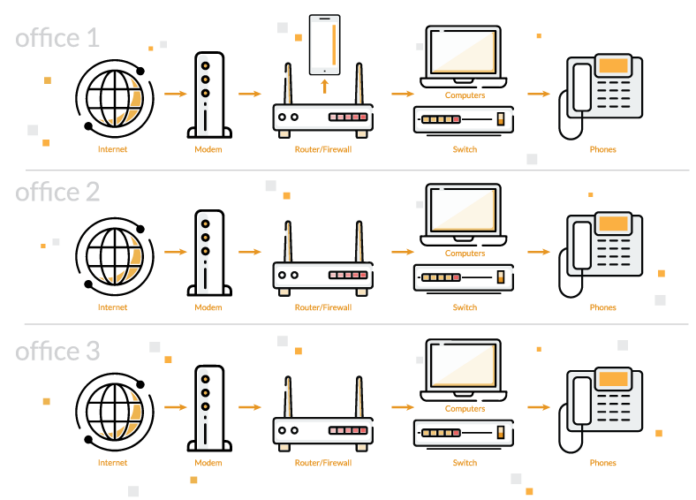
Furthermore, if you want to add or set up new centers, you do not have to worry about getting new phone lines or purchasing additional hardware. You can set up new offices quickly and simply have calls routed to the new location, keeping your existing numbers and lines.
4. Gain Access to a Multitude of Virtual Communication Features
With virtual call center software, you have access to voice calls, video conferencing, SMS/instant messaging capabilities, and more. This gives you the opportunity to offer better customer service in ways that customers and prospects will appreciate.
5. Improve Employee/Agent Satisfaction
Finally, with easy-to-use software and flexible work options, you will be increasing employee/agent satisfaction. This is essential to training call center agents and motivating them to continue to do a good job.
How to Choose the Ideal Virtual Call Center Software?
When choosing the perfect call center software, consider the following factors and look for a virtual call center platform that:
1. Is Easy to Set Up and Use
When researching various software and virtual phone system providers, pay attention to the software’s ease-of-use. Is it too complex? Would the complexity hinder use and performance? Global Call Forwarding’s virtual communication system is quick to set up and use. You don’t have to worry about extra hardware to purchase or install. And you can train new employees to use the software within minutes.
2. Comes Equipped with Relevant Features
Virtual communication features are an important aspect of any virtual call center software. However, not all features may be relevant to your needs. Determine what features you need and which would be good additions. We offer the following features:
Multiple virtual phone number types (toll free, local, and international numbers)
With a VoIP phone system, you can cut down on costs while still expanding your business and entering it in international markets. Therefore, look for a software provider that can give you the global reach you desire. List down the cities, markets, and areas you want to target and find a provider that offers you communication solutions for these areas within a reasonable budget.
4. Offers Reliable and Quality Service
Additionally, you want to choose a provider that has had some experience and credibility in the industry. See how long providers have been in the market and what customer reviews and testimonials are saying about the service. Is this a service you can rely on? If you’re not sure, can you easily get out of the service or is it contract-based?
5. Has a 24/7 Customer Support
Finally, look for a provider that offers 24/7 customer support, whether it is phone, email, live chat, support tickets, or an online knowledge base to assist you with issues. A provider should be easily accessible and reachable whenever you need them.
Get Virtual Communication Solutions with Global Call Forwarding
Want to learn about our virtual call center solutions? Call us at 1 (888) 908 6171 or chat with us online to see how we can help improve your business phone system today.
As businesses transition to the cloud and internet services, your faxes should not be left behind. Fax over IP or a FoIP service is an IP telephony service that enables fax transmission via the internet, which makes sending and receiving business documents easier and safer.
What is FoIP? Fax Over IP Explained
Fax over IP — also known as FoIP service or eFaxing — is an telephony feature that sends fax documents using internet protocols instead of the PSTN. Public switched telephone network (PSTN) has dominated the fax transmission game for years. However, internet protocols have paved way for services such as fax over IP to become possible. All that is required is a reliable internet connection and bandwidth to carry the faxes.
How Does Fax Over IP Work?
A FoIP service works similarly to voice over IP; that is, files are converted into digital packets and then transferred from one endpoint to the next. With eFaxing, your fax document is converted into a packet, encapsulated in a transport protocol, and transmitted to the destination. Both endpoints are usually fax machines that work with a FoIP gateway or adapter to enable the sending and receiving of faxes.
In some cases, your business can even get a fax forwarding service that forwards incoming faxes directly to your email. In other words, when your fax machine receives a fax, it can reroute the fax to a predetermined destination such as a business email ID.
4 Benefits of Using a FoIP Service
So, why should your business consider getting FoIP? Here are the top 4 benefits of using a fax over IP service:
1. Unified communications
You can easily fit or integrate FoIP into your existing business communication tools. This means that you do not need a separate or additional analog network to use the service. You can access important communication tools from the same network.
2. Content management
By transmitting fax over an IP network, you can manage important business and customer documents by digitizing, archiving, emailing, and storing them on the cloud.
3. Lower costs
Faxing over IP is often less expensive than using a traditional fax machine. For instance, the per-message rate is lesser than PSTN. Additionally, by unifying network connectivity, you are paying for one less network. This can result in definitive cost-savings.
4. Remote access and usage
Lastly, you can access the faxes from any device; even in areas where physical fax lines cannot be installed. This is an advantage for businesses with remote workers and distributed teams using their own devices.
Is Fax Over IP Right for Your Business?
There is only one way to find out: give a FoIP service a try. If your business deals with faxes on a daily basis and you want a reliable means to handle important documents, then FoIP may be the right solution. Call our experts today to learn more!
Cookie Settings
We use cookies to enhance your experience and analyze data for continuous website improvement.